
The short answer is 7 to 14 days for a focused build
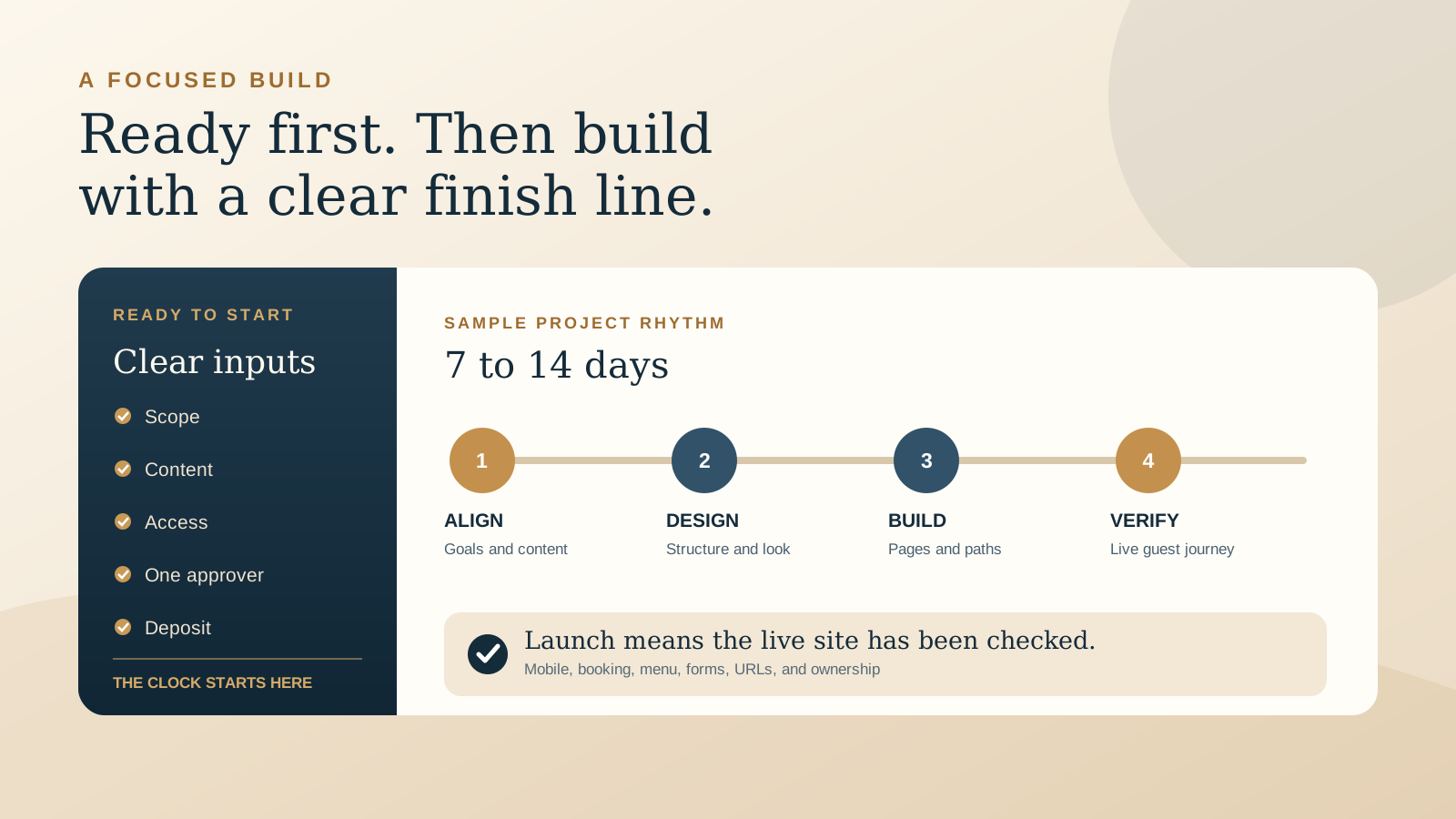
Nagi Creative's normal delivery window is 7 to 14 days after the required assets and deposit are received. That range is suitable for a focused project with a settled scope, available content, known integrations, and one clear person approving the work.
It is not a universal promise for every website. A compact restaurant site with a menu, contact details, gallery, and an external booking link is a different project from a multilingual boutique stay site with room pages, a booking engine, custom forms, and migrated search content. The timeline should follow the actual work, not a headline number.
The most useful question is therefore not only, “How many days will the build take?” Ask when the clock starts, what must be ready first, which decisions are included, and what can extend the schedule.
Define what ready to start means
A signed proposal and deposit confirm the commercial start. The production start also needs the material required to make accurate pages. For most hospitality websites, ready to start means the following items are available or have an agreed delivery date:
- Scope: the pages, languages, booking path, ordering path, forms, and other integrations are written down.
- Venue facts: the correct name, address, hours, phone, email, menu, policies, and service details are confirmed.
- Brand material: the logo files, colours, fonts, and any current guidelines are shared.
- Photography: approved images are supplied in usable resolution, with permission to publish them.
- Accounts and access: the domain, hosting, analytics, booking, ordering, and form destinations have named owners.
- Approval path: one person can collect feedback and make decisions within an agreed response window.
Not every item has to be perfect before design begins. Missing information must be visible in the schedule, though. If a photo shoot is happening next week or a menu is awaiting final prices, decide whether the build will use approved temporary content, pause at that point, or launch in a later window.
A practical sample timeline
This example shows how a focused 7 to 14 day build can move. It is a planning model, not a fixed sequence for every venue.
- Day 1, alignment and content check. Confirm the goals, page list, guest actions, supplied material, integrations, current URLs, and launch responsibilities. Resolve obvious gaps before they become design revisions.
- Days 2 to 4, structure and visual direction. Shape the navigation and page sections around the decisions guests make. Establish the visual direction with the real logo, images, menu content, and calls to action.
- Days 5 to 8, build and integration. Build responsive pages, place approved content, connect booking or ordering links, configure forms, and prepare the important technical details.
- Days 9 to 11, mobile review and quality checks. Test key guest paths on a phone and desktop. Check details, links, form delivery, image treatment, accessibility basics, and performance.
- Days 12 to 14, consolidated feedback and launch. Apply the agreed revision round, receive final approval, publish to the correct domain, verify the live site, and complete the handover.
Some small projects will need less time. A larger scope, new copy, new photography, complex integrations, multiple languages, or a staged migration can need more. The proposal should show the range that fits your project and separate the build window from any lead time for content, accounts, or third party work.
Know the common causes of delay before work begins
Website schedules usually become uncertain at the handoffs. The designer may be ready to build while the venue is still waiting for a menu, photography, platform access, or a decision from several people. Naming those dependencies early makes the timeline more useful.
- Content arrives in pieces. Late menu changes, missing room details, and unapproved images can affect several pages at once.
- Feedback conflicts or expands. Separate comment threads from several stakeholders create rework. New pages or functions should be treated as a scope decision.
- External accounts are not ready. Booking, ordering, email, domain, and analytics access can block testing even when the page design is complete.
- The launch date ignores operations. A busy service period, menu change, or staff training window may be the wrong time to switch systems.
- Ownership is unclear. If nobody knows who controls the domain or provider account, a simple launch task can become an access recovery project.
Build a small decision buffer into the schedule. If an important dependency is late, agree which later date moves with it. This is clearer than compressing testing to protect an arbitrary launch day.
Prepare the facts, files, and decisions your guests depend on
The owner does not need to design the website before hiring a designer. Preparation should focus on the source material and business decisions only the venue can confirm.
- Choose the primary action for each audience, such as book a table, view the menu, order direct, enquire about an event, or check availability.
- Provide the current menu, hours, contact details, address, access notes, booking rules, room facts, and other guest essentials.
- Gather the original logo files and the strongest approved photographs. Label images when the subject or location is not obvious.
- Confirm who owns the domain and key service accounts, then provide secure access through the agreed method.
- Name one approver and reserve time to review the real mobile pages in one consolidated pass.
- Choose a sensible launch window and identify any event, holiday, menu change, or campaign that affects it.
If you are still deciding what the existing site needs, the free Restaurant Website Quick Score can identify three practical priorities before you request a proposal.
Ask the proposal to state what the timeline includes
A useful proposal should connect time, scope, responsibilities, and approvals. Look for a start condition, estimated build window, page and feature list, content responsibilities, included revision rounds, integration responsibilities, launch process, and handover. Our guide to what a restaurant website quote should include explains how to compare the wider scope and cost.
The proposal should also state what happens when content is late or the scope changes. A new language, new booking flow, or new page may be worthwhile, but it should not be hidden inside the original schedule. Agree whether it changes the fee, delivery date, or both before the extra work begins.
Ownership belongs in the plan too. The venue should know who owns the domain, website account, analytics, booking tools, and final files. Read the practical guide to restaurant website domain and hosting ownership before access becomes urgent.
A launch is complete after the live website is checked
Publishing files is only one part of launch. Open the production domain on a phone and desktop, then check the guest paths that matter: menu, booking, ordering, directions, phone, email, enquiry forms, and any room or event path. Confirm that the venue details and current calls to action are correct.
For a redesign, preserve useful URLs where possible and map changed URLs to appropriate permanent redirects. Check the canonical URL on each important page and include the canonical public URLs in the XML sitemap. Google documents sitemaps as a way to tell search engines which URLs you prefer to have crawled, and canonical markup as one signal used to identify the representative URL. Neither step promises indexing or ranking.
After launch, submit or confirm the sitemap in Google Search Console and use URL Inspection when you need to inspect an important page or request recrawling. Google states that recrawling can take days to weeks and that a request does not guarantee inclusion in search results. Record what was submitted and check later rather than calling the search work complete on launch day.
The restaurant website redesign checklist covers URL mapping, guest paths, search basics, and rollback planning in more detail.
Want a practical review before you set the timeline?
The US$35 Website Check reviews your live mobile journey, menu, booking path, essential information, visual clarity, and search basics. You receive clear priorities that can help shape a focused scope before a larger website project begins.
Get the US$35 Website CheckSources
- Google Search Central, Build and submit a sitemap
- Google Search Central, Ask Google to recrawl your URLs
- Google Search Central, Canonicalization