
The short answer is one brand site, with one real page for each real location
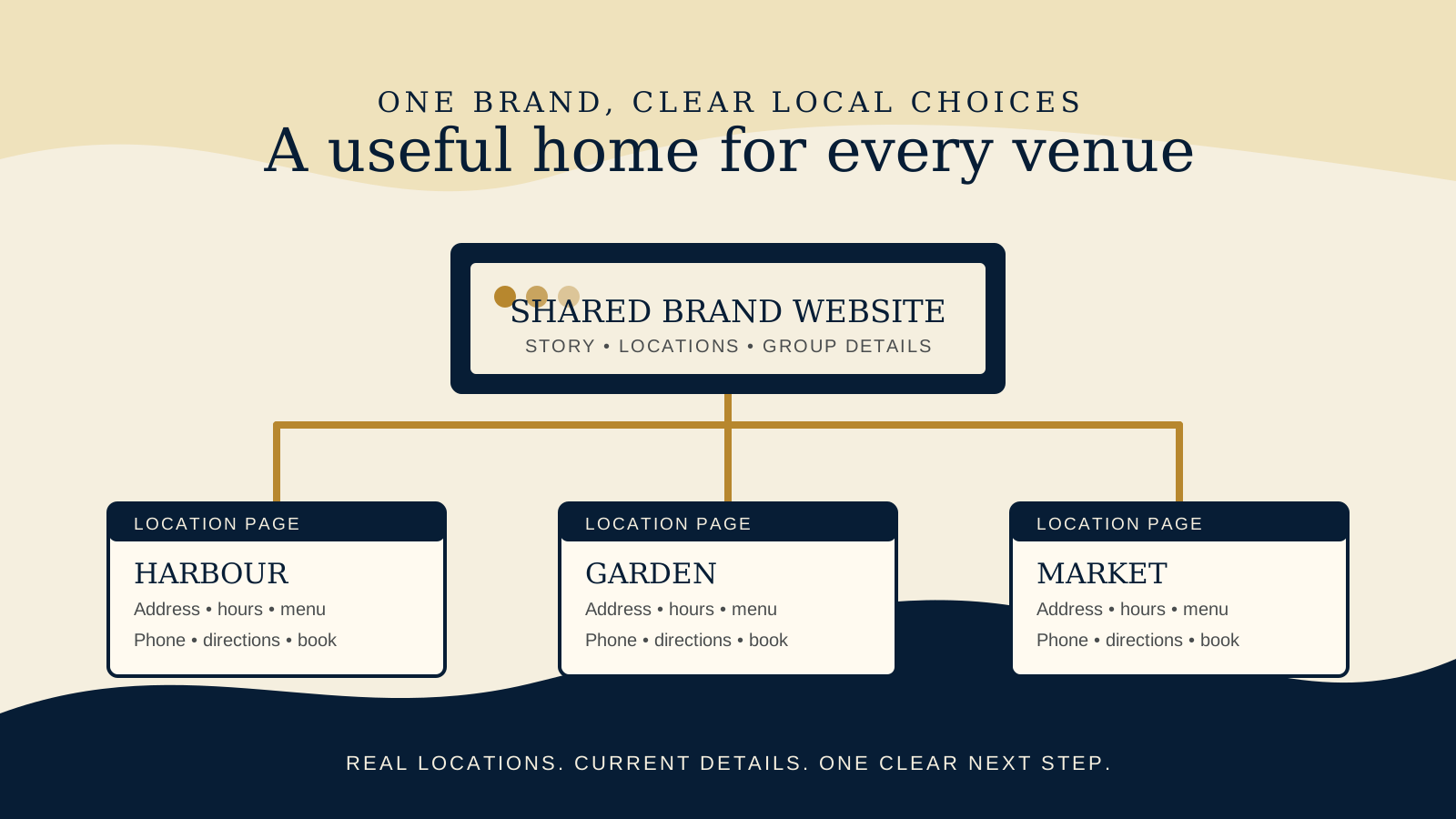
For an independent restaurant group, cafe group, or boutique stay with two to five locations, a shared domain is usually the most practical structure. It keeps the brand story, core navigation, and maintenance in one home while letting every venue have a crawlable page with its own address, hours, phone, menu or room information, directions, and booking or enquiry path.
That recommendation changes when the locations are genuinely separate businesses. Different brands, owners, operations, audiences, offers, or guest expectations may deserve separate sites. The website should follow the real business and guest experience, not force unrelated venues into one polished looking structure.
A good multi location site does not make a guest decode the organisation chart. It lets them choose a place, confirm the details, and act. The same principle sits behind a sensible one page or multi page restaurant website decision: build around the tasks a guest actually needs to complete.
Use one shared domain when the brand and guest promise are truly shared
One domain is usually a good fit when the venues trade under the same public brand and offer a recognisably connected experience. They may have different neighbourhoods, menus, service times, or interiors, but a guest still understands that they are choosing between locations of the same business.
A simple structure might be a brand home page, a locations hub, and stable URLs such as /locations/harbour/ and /locations/garden/. The location page is not a second homepage. It is the page that answers the local questions a guest has before they book, visit, call, or order.
Keep shared material genuinely shared. The brand story, gift cards that work across the group, careers, press, and a group wide events calendar may belong at the main level. Keep details that vary by venue close to the location. If lunch runs at one venue but not another, make that distinction easy to spot instead of hiding it in a general menu.
Give every real location a useful, crawlable page
Every venue open to guests should have a page that can be reached through ordinary links from the website, including the locations hub and relevant navigation. A guest should not need to use a map widget, a search box, or a social profile to discover the page. A search engine needs a clear path too.
At a minimum, make the local facts visible and current:
- The location name as guests see it, the full address, a map or directions link, and a local phone number where one exists.
- Regular and special hours, including any meaningful difference in breakfast, lunch, dinner, bar, or check in service.
- The venue specific menu, room information, service offer, events, or facilities that make the choice useful.
- A booking, ordering, calling, or enquiry route that leads to the correct venue.
- Practical arrival details such as parking, accessibility, dress expectations, or hotel arrival information when those details differ.
Useful pages can share a visual system and a clear template. They should not be copies with only the suburb name changed. The guide to restaurant structured data is helpful once the page itself has truthful location details worth marking up.
Choose separate sites when the businesses are independent in the ways guests can feel
Separate sites become reasonable when a shared domain would make the guest journey less honest or less clear. A chef led fine dining room and a casual bakery may share investors but have separate names, menus, booking systems, teams, and audiences. A boutique stay with a restaurant that trades as its own public brand may need its own space when a guest would not reasonably treat it as part of the same booking decision.
Consider separate sites if most of these are true:
- Each business has a distinct public brand, identity, and guest promise.
- Ownership, management, operating rules, or commercial priorities are meaningfully separate.
- The location has its own booking, ordering, loyalty, event, or accommodation journey.
- A guest arriving from a search result needs a different explanation of what the business is and what to do next.
- The teams can responsibly maintain separate content, technical access, and current information.
Shared ownership alone is not a reason for a shared site. On the other hand, slightly different menus are not automatically a reason to split. Start with the real brand and the guest's next step.
Make the location choice obvious before the guest reaches the wrong path
On a phone, a guest may land directly on the group home page, a menu page, or a location page from a search result. Give them a visible way to confirm or change the venue. A compact location selector in the header can work well when it shows the current choice and leads to real location pages.
Do not send every booking button to a generic page that asks the guest to begin the choice again. Where the booking system supports it, a button on the location page should open that venue's booking flow. Where it does not, name the next choice clearly. The same applies to ordering, event enquiries, gift cards with venue limits, and boutique stay availability.
Test the flow with a practical question: can a first time guest tell which venue they are about to contact or book without reading fine print? The restaurant website mobile UX checklist helps test that path from location choice through to action.
Keep Google Business Profiles and website details aligned by location
Google's Business Profile guidance says each individual business location should have its own profile. The website and phone number shown for that profile should represent the individual location. For locations operating as a chain or shared brand, Google also asks for consistent names and categories where the same service is offered.
That is a strong reason to treat the location page as a maintained operational page, not a one time marketing page. Check the address, opening hours, phone, menu link, and booking link against the venue's actual information whenever something changes. Complete and accurate Business Profile information can help a business appear in local results, but local results are mainly shaped by relevance, distance, and prominence. Google says there is no way to request or pay for a better local ranking.
Keep the work grounded in the guest's reality. A correct location page helps someone find the right place and understand whether it fits their visit. It does not promise a ranking outcome.
Use location specific LocalBusiness details where the page can support them
When a location page contains complete, visible business details, its structured data can describe that specific venue. Google Search Central says a LocalBusiness url should be the fully qualified URL of the specific business location. The name and address belong to that location, with telephone, menu URL, and opening hours among the recommended details where they apply.
Do not put the group address, a generic phone number, or a location list into every venue record. Mark up what the page can prove. If the menu or hours vary, use the URL and hours for that exact venue. Keep the structured data, visible page, Business Profile, and operations process working from the same current source of truth.
Markup supports clear information, but it is not a substitute for a useful page or a guarantee that any search feature will appear. Review the full local page first, then validate the implementation as part of launch.
Do not create thin doorway pages or locations that do not exist
A page is not useful simply because it names a neighbourhood. Avoid pages that repeat the same copy with a city swapped in, list a delivery area as though it were a storefront, or imply that a future venue is already open. Those pages can confuse guests and leave the team responsible for details it cannot actually support.
Use a location page for a real guest facing venue. If a group serves a wider area without a public location, explain the service area and contact route honestly on the relevant business page. If a new location is not open, use a clearly labelled announcement only when there is useful, confirmed information to share. Do not make it look bookable or visitable before it is.
For every published location page, assign a person who knows when its hours, menu, booking link, phone, or arrival details change. That small ownership decision is more valuable than publishing a larger set of unmaintained pages.
A practical rollout for two to five real locations
- Map the real business: List the public brands, real guest facing locations, shared services, and the details that differ at each venue.
- Choose the structure: Use one shared domain for a genuine shared brand, or separate sites where brands, operations, and guest journeys are independently run.
- Build the locations hub: Let a guest compare the meaningful choice, then link to every real location page using ordinary crawlable links.
- Complete each page: Add current local facts, a venue specific action path, useful practical detail, and the venue's actual offering.
- Align the records: Check the website against each relevant Business Profile and location specific structured data before launch or after a material change.
- Test on a phone: Start from a search result or the main site, choose a venue, read the local detail, and take the intended action without being sent to the wrong location.
- Assign upkeep: Name the person responsible for local changes and set a quick check for special hours, menu changes, booking changes, and openings or closures.
Before changing the structure, use the free Restaurant Website Quick Score to check the essentials across the guest journey. It can help you see whether the next useful improvement is a clearer location path, a more current menu, or a simpler booking route.
Want a practical review of your locations journey?
The US$35 Website Check reviews the live mobile journey, location and contact clarity, menu or stay information, booking or ordering path, and search basics. It can help you choose the first structural fix without assuming every venue needs a separate site.
Get the US$35 Website CheckSources
- Google Business Profile, guidelines for representing your business on Google
- Google Business Profile, tips to improve your local ranking on Google
- Google Search Central, LocalBusiness structured data