
The short answer is to build a real path for each language you can maintain
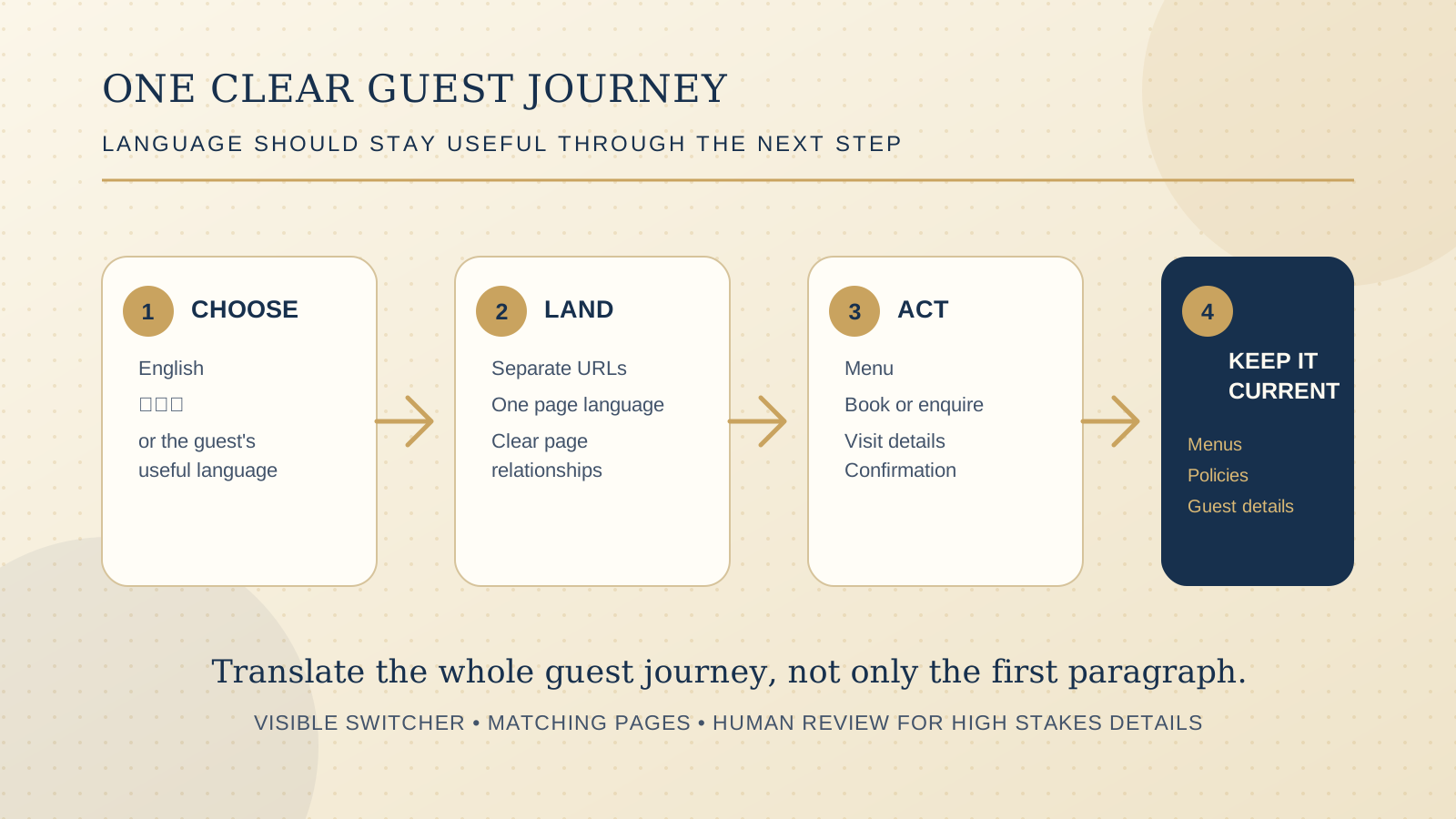
For most independent restaurants, cafes, and boutique stays, separate pages at stable URLs are the stronger starting point when serving guests in more than one language matters. Each page can have one primary language, a clear language selector, and content that a guest and a search engine can understand without guessing.
Automatic translation can help a team prepare a first draft or support a small temporary notice, but it is a weak substitute for a maintained guest journey. Menu descriptions, allergens, booking rules, cancellation terms, opening hours, directions, and accessibility details need the same care in every language a venue presents as official.
Google's guidance for international and multilingual sites recommends different URLs for each language version and helps sites communicate the relationship between versions with hreflang. The W3C also recommends identifying the language of each page and marking a change in language within a page when one occurs. Those details make the structure clearer for search tools and assistive technology.
Choose the language that removes a real guest decision
Do not start with a long list of markets. Start with the guests who already hesitate at a practical step. A venue near a visitor precinct may need the language that helps travellers read the menu and find the booking link. A neighbourhood cafe may need the language its regular community uses for opening hours, dietary information, and directions. A boutique stay may need the language that helps an international guest understand rooms, policies, and arrival details.
Look at real evidence before committing to a new version:
- Questions the team receives repeatedly by phone, email, booking notes, or in person.
- Search, website, or booking data that identifies a consistent audience, interpreted alongside what the venue actually knows about its guests.
- Pages where a misunderstanding has a meaningful guest cost, such as menus, allergens, deposits, check in instructions, parking, or cancellation rules.
- The person who will review changes whenever the source language changes.
A multilingual homepage alone rarely completes the job. If it sends a guest to a menu, booking system, enquiry form, or policy that they cannot understand, the choice still becomes uncertain at the point where it matters most.
Use a crawlable page for each language version
Give each language version its own stable URL. For example, a venue might use /en/menu/ and /ja/menu/, or a clear equivalent that fits the current website. Keep the structure predictable. The translated menu page should lead to the matching booking, contact, policy, and location details in that language wherever those paths exist.
Google says it uses visible content to determine a page's language. Set the page's lang attribute to match its primary language, keep the main content in that language, and use hreflang annotations to identify corresponding versions. The W3C's guidance explains that the page language is especially important for browsers and assistive technologies that need to present the content appropriately.
A practical page map can be small at first:
| Guest task | Language versions to keep aligned | Check before publishing |
|---|---|---|
| Choose the venue | Home, location, hours, phone, directions | Names, map links, holiday hours, contact actions |
| Understand the offer | Menu, room types, services, private dining, events | Current items, price treatment, dietary and policy wording |
| Make a booking or enquiry | Booking page, form labels, deposit and cancellation information | Working link, confirmation language, required fields |
| Plan the visit | Arrival, parking, accessibility, check in, contact | Practical detail is current and easy to scan on a phone |
Do not force a guest to a different language based only on browser settings, location, or a guess about their preference. Google specifically warns against automatic redirects based on perceived language because visitors may not want that version and search crawlers may not discover every variation. A visible choice gives the guest control.
Make the language switcher visible and honest
Put the language selector where a guest expects it, usually in the header and again near the end of a long page. Name each choice in the language itself, such as English or 日本語, rather than relying only on flags. Flags represent countries, not a complete language decision, and can create ambiguity for guests.
The selected language should be obvious. The switcher should take a guest to the equivalent page when it exists, rather than dropping them at the home page. When an equivalent has not been translated yet, say so plainly and send the guest to the closest useful page. Do not label a language as available if only a title or a few paragraphs have been translated.
For a page that includes a short phrase, dish name, or quotation in another language, mark that changed portion with the appropriate language in the HTML. W3C guidance calls this out because a page can have one overall language while still containing distinct language fragments.
Translate the whole guest journey, not only the body copy
A language version feels unreliable when the headline is translated but the navigation, buttons, error messages, forms, booking instructions, cookie notice, footer, and confirmation page remain in another language. Audit the journey on a phone from first page to final action.
For each translated page, check:
- Navigation and buttons: The menu, labels, calls to action, and key links match the language the guest chose.
- Forms and confirmation: Labels, required field notes, errors, and success messages are understandable, including any embedded booking or enquiry step.
- Details that change: Hours, menus, availability, venue information, package inclusions, and event dates still match the source version.
- Policies and consent: Booking deposits, cancellations, privacy notices, and any terms shown before an action are reviewed for that language.
- Mobile reading: Long language names, menu items, and buttons do not wrap into an awkward or unusable layout.
- Exit paths: Phone, directions, email, and booking links work from the translated page.
The restaurant website mobile UX checklist is a useful companion for testing the menu, booking, and contact paths after you add the second language.
Treat menu, allergen, and policy wording as high stakes copy
Some text can carry a much bigger consequence than a welcome message. Allergen and dietary information, prices, ingredients, alcohol information, booking deposits, cancellation rules, room policies, arrival instructions, and accessibility details should be reviewed by a person who understands both the wording and the venue's real operations.
Keep a simple change log. When the source menu or policy changes, name the owner of the translated version, record what needs review, and publish the update together. If the venue cannot verify a translated policy or menu detail, do not present it as final. Provide a clear way for the guest to contact the venue instead.
This is not a call for every page to become lengthy or expensive. It is a call to start with the pages where clarity protects the guest and the business, then add more only when a team can maintain them.
Use a staged language rollout that the team can keep current
A good first release is usually smaller than a full site translation. Begin with one language and the essential guest path. Confirm that the page structure, language selector, content ownership, and update process work in practice. Then add the next useful page set.
- Map the guest decision: Identify the language, pages, and actions that solve a real question.
- Build the structure: Create stable language URLs, page language metadata, matching navigation, and the appropriate language relationships.
- Review operational copy: Check menus, allergens, policies, prices, dates, booking instructions, and location details with the right venue owner.
- Test the complete path: Use a real phone to switch language, read the menu, start a booking or enquiry, and follow the confirmation route.
- Assign upkeep: Give one person responsibility for each source change and translated update before expanding the scope.
For a venue deciding whether the current website helps guests take action at all, the free Restaurant Website Quick Score gives a quick baseline across the essentials. Use it before choosing which language path deserves attention first.
Questions to ask before adding another language
- Which guest question, booking obstacle, or visit detail will this version make easier?
- Which pages must be ready before we call the language available?
- Who checks the translated menu, allergen, policy, price, and booking wording?
- Will the selected language stay visible through the booking, form, and confirmation journey?
- Where are the separate URLs, page language settings, and language relationships documented?
- What happens when the source menu, hours, policy, or booking process changes next week?
- Which page set can we maintain well now, and which should wait for a later stage?
Want a practical review before you translate?
The US$35 Website Check reviews the live mobile journey, menu, booking or ordering path, essential venue details, visual clarity, and search basics. It can help you identify the pages worth preparing first, so a new language version supports a real guest decision.
Get the US$35 Website CheckSources
- Google Search Central, managing multi regional and multilingual sites
- Google Search Central, telling Google about localized versions of your page
- W3C, declaring language in HTML
- W3C, tagging text with no language