
The short answer is to decide the POS commitment before comparing website features
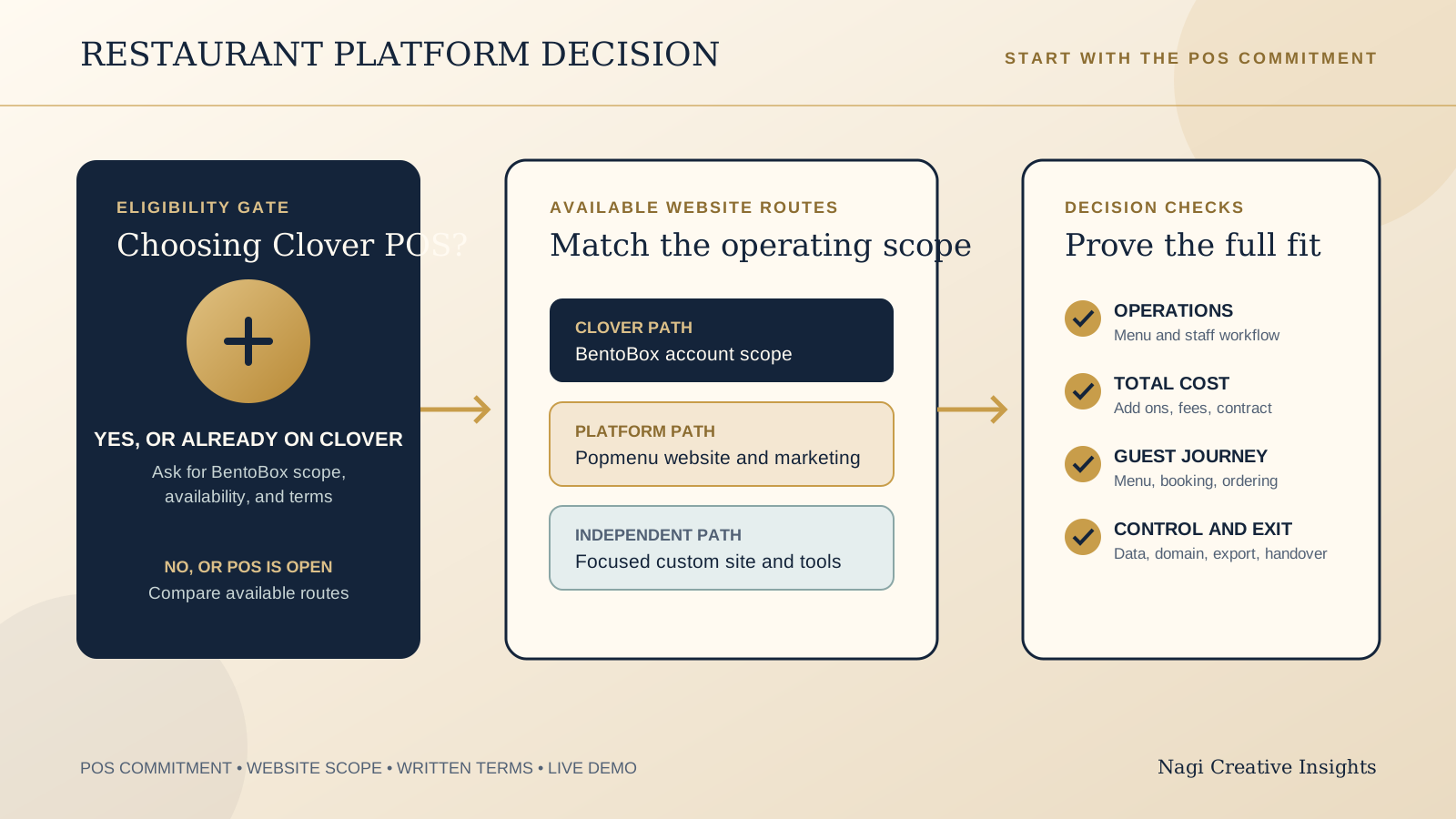
If your restaurant is not already on Clover and is not choosing Clover as a POS decision, BentoBox is not currently a direct website-only option for a new customer. BentoBox's official home page says it is now Clover, and that new BentoBox products and services are currently only available to Clover POS customers.
Popmenu remains a website and marketing platform option with public US plan pricing. Its published plans can be a useful starting point, but compare the total operating bundle, add ons, US$1 online order fee, contract, guest data, and exit process rather than the website alone.
An independent custom site remains a valid third path when the venue wants more brand control, a smaller feature set, or freedom from a platform bundle. This is not a verdict against either vendor. It is a way to choose the scope and commitment your restaurant can genuinely operate.
Start with the current BentoBox eligibility gate
Do not begin this comparison with templates, menu layouts, or marketing features. Begin with whether the restaurant is making a Clover POS decision. BentoBox states that new BentoBox products and services are currently available only to Clover POS customers. Existing BentoBox or Clover Hospitality customers are directed to the help center or their customer success manager.
That makes the first choice simple. A restaurant already committed to Clover can ask how BentoBox fits its account and operations. A restaurant not choosing Clover should not treat BentoBox as a standalone website quote it can simply buy. It should compare options it can actually procure, including Popmenu or an independent site connected to the restaurant's chosen tools.
BentoBox's platform setup page may help existing account holders understand available account context. It does not mean those modules are independently purchasable by a new restaurant without Clover. Ask for written confirmation of eligibility, scope, and local availability before making a public website plan.
Map the restaurant operating stack before judging the website
A restaurant website can carry menus, reservations, ordering, catering, events, marketing capture, and guest messaging. Every added function can also add a source of truth, staff task, fee, or support dependency. Write down what already owns each part of your operation: POS, reservation service, online ordering, email list, event calendar, domain, analytics, and menu updates.
For a Clover restaurant, ask whether the proposed BentoBox scope replaces a current step or adds another handoff. For Popmenu, compare the proposed website and marketing bundle with the services you already pay for. Popmenu says its team designs and builds the website, supports real-time menu changes, mobile responsive layouts, analytics, and connection of an existing domain.
A custom site can be the clearest option when the venue needs a focused menu, booking or ordering handoff, location detail, and distinctive visual identity without adopting a wider platform. Our restaurant website builder versus custom guide can help you separate the website decision from the tools around it.
Use published Popmenu pricing as a starting point, then price the complete bundle
Popmenu's official US pricing page, checked October 12, 2026, lists Starter at US$159 per month when prepaid annually, Essentials at US$269 per month when prepaid annually, and Premier at US$449 per month when prepaid annually. The page says annual plans receive a 10 percent discount and multi-location pricing receives tiered savings.
Popmenu describes Starter as including an SEO-driven website, interactive menu, Google Business Profile sync, guest contact collection, automated email marketing, easy menu updates, dish reviews and responses, a WCAG conformant platform, event calendar, and OpenTable menu and guest data integration. Online ordering and catering are add ons. Popmenu says it charges a flat US$1 per online order, which can be passed to the guest or absorbed by the restaurant.
Those are published US starting points, not a complete operating total or a promise that a particular plan fits your venue. Pricing and product availability can change, may vary by location, and must be confirmed in a written quote. Compare onboarding, add ons, order volume, payment charges where relevant, contract term, tax, support, implementation, and any current tools you would keep or replace. The restaurant website monthly costs guide helps make that recurring-cost list visible.
Test who can update the menu, how quickly, and with what approval
Popmenu describes real-time menu changes and easy menu updates. That is useful only when the restaurant can identify the person who updates each menu, what happens when a dish sells out, and how prices, dietary details, service times, and online ordering stay aligned. Ask to change one real menu item in the demo, then follow the result on a phone, Google profile, website, ordering path, and any reservation or event context that matters.
For an existing BentoBox and Clover account, test the same real workflow against the exact modules in the proposed scope. Do not assume a feature described on a platform page is in your account, included in the current agreement, or available in your location. Request the administrator roles, update route, approval controls, and recovery path in writing.
A custom site needs an equally clear maintenance plan. It may have fewer moving parts, but the restaurant must still know where the public menu is edited, who has access, and how an urgent correction reaches the live site. Simpler is valuable when it removes a recurring source of error, not when it leaves staff without a supported route.
Follow the guest journey through reservations, ordering, and contact capture
Start at the restaurant's live homepage on a phone. Find today's menu, confirm the relevant location and hours, begin a reservation or order, inspect the full price and policy context, complete the action or reach the intended handoff, then look at the confirmation and support route. Repeat it for a group enquiry or event if those are material services.
Popmenu lists an interactive menu, Google Business Profile sync, guest contact collection, automated email marketing, event calendar, and OpenTable menu and guest data integration in Starter. Verify the exact implementation offered to your venue, including existing account connections, consent language, data access, mobile display, and what happens when a connected tool is unavailable.
If your POS decision remains open, compare that bigger operational question separately. Our Toast versus Square restaurant website guide explains why a website platform cannot be chosen cleanly without understanding the restaurant system around it.
Clarify control, guest data, and the exit path before signing
Ask who owns and administers the domain, billing account, original photography, page copy, menu content, analytics access, guest contact data, and connected service credentials. Keep business-critical accounts in the restaurant's name, with individual staff access where available. Our guide to restaurant website domain and hosting ownership covers the practical handover questions.
Ask what information can be exported, in which format, by whom, and when access ends after cancellation. Include menu content, guest contact records, reporting, event data, page assets, redirects, domain settings, and integration setup. Confirm notice periods, final billing, support during transition, and the process for preserving search-visible pages or mapping their URLs.
Control does not require building everything from scratch. It means knowing where each essential asset and record lives, which account controls it, and what the restaurant can take with it if the platform, manager, or supplier changes.
Use this neutral comparison table to plan your shortlist
| Decision area | BentoBox | Popmenu | Independent custom site |
|---|---|---|---|
| New customer eligibility | New products and services currently available only to Clover POS customers | Public US website and marketing plans are published | Scope can match the restaurant's chosen tools |
| Published price context | Ask existing Clover account team for written scope and terms | US$159, US$269, or US$449 monthly when prepaid annually, before relevant add ons and order fees | Compare project scope, hosting, tools, and maintenance separately |
| Operations | Test exact Clover account modules and staff workflow | Test website, menu, marketing, ordering, catering, and connected tools offered | Choose only the guest paths the venue needs |
| Control and exit | Confirm exports, account access, contract, and transition in writing | Confirm guest data, assets, add ons, order fees, contract, and transition in writing | Define ownership and support responsibilities in the project agreement |
| Best next question | Are we choosing Clover for POS, and is this exact BentoBox scope available to us? | What is the complete US operating total for our real volume and required add ons? | Which small set of guest actions must the site support, and who maintains each one? |
Get the decision-changing terms in one written quote
- Eligibility, named products, location availability, and every included or excluded module.
- Subscription, implementation, add ons, online ordering and catering terms, order fee treatment, taxes, and payment-related charges where relevant.
- Contract term, renewal, price changes, cancellation, notice, and any minimum commitment.
- Menu, website, reservation, ordering, event, Google, and marketing integrations included for your exact accounts.
- Administrator roles, training, support route, response expectations, and the restaurant's ongoing responsibilities.
- Domain, page content, photography, analytics, guest records, reporting, exports, and access after notice or cancellation.
- Migration, redirects, future reservations or orders, and the transition plan if the restaurant exits.
Keep vendor performance statements as vendor claims until they are demonstrated in your setup. Pricing and product availability can change, may vary by location, and should be confirmed in a written quote rather than remembered from a sales call or webpage.
Run one live demo test with your real restaurant facts
- Bring one current menu, service period, price change, dietary note, event, and booking or order scenario.
- Ask the proposed administrator to update the menu, then inspect the public phone view and connected guest paths.
- Start at the homepage and complete a reservation, order, or intended handoff with the full total, policy, and confirmation visible.
- Test the exact connections you use, including Google, OpenTable where relevant, ordering, email capture, and domain setup.
- Ask a daily operator to complete the task without the sales presenter taking over.
- Inspect roles, exports, account recovery, cancellation sequence, and what a new website partner would need for a handover.
- Mark each requirement as demonstrated, included, add on, unavailable, or still unconfirmed, then attach the written quote.
Start with the free Restaurant Website Quick Score
Before adding a platform, use the free Restaurant Website Quick Score to review nine guest essentials and get three priorities. It can show whether the immediate issue is the menu, location, booking path, ordering handoff, or mobile clarity, rather than a missing platform feature.
Need a clear view of the website you have before changing platforms?
The US$35 Website Check reviews the live mobile journey, menu, booking or ordering path, essential venue details, visual clarity, and search basics. Use it to separate a fixable website issue from a genuine platform decision, then take a sharper brief into your vendor conversations.
See the US$35 Website CheckSources
- BentoBox, official home
- BentoBox, initial platform setup
- Popmenu, US pricing
- Popmenu, restaurant website design
Official product pages checked October 12, 2026. Vendor product descriptions and pricing can change, may vary by location, and should be confirmed in a written quote.