
The short answer is to protect the operation first
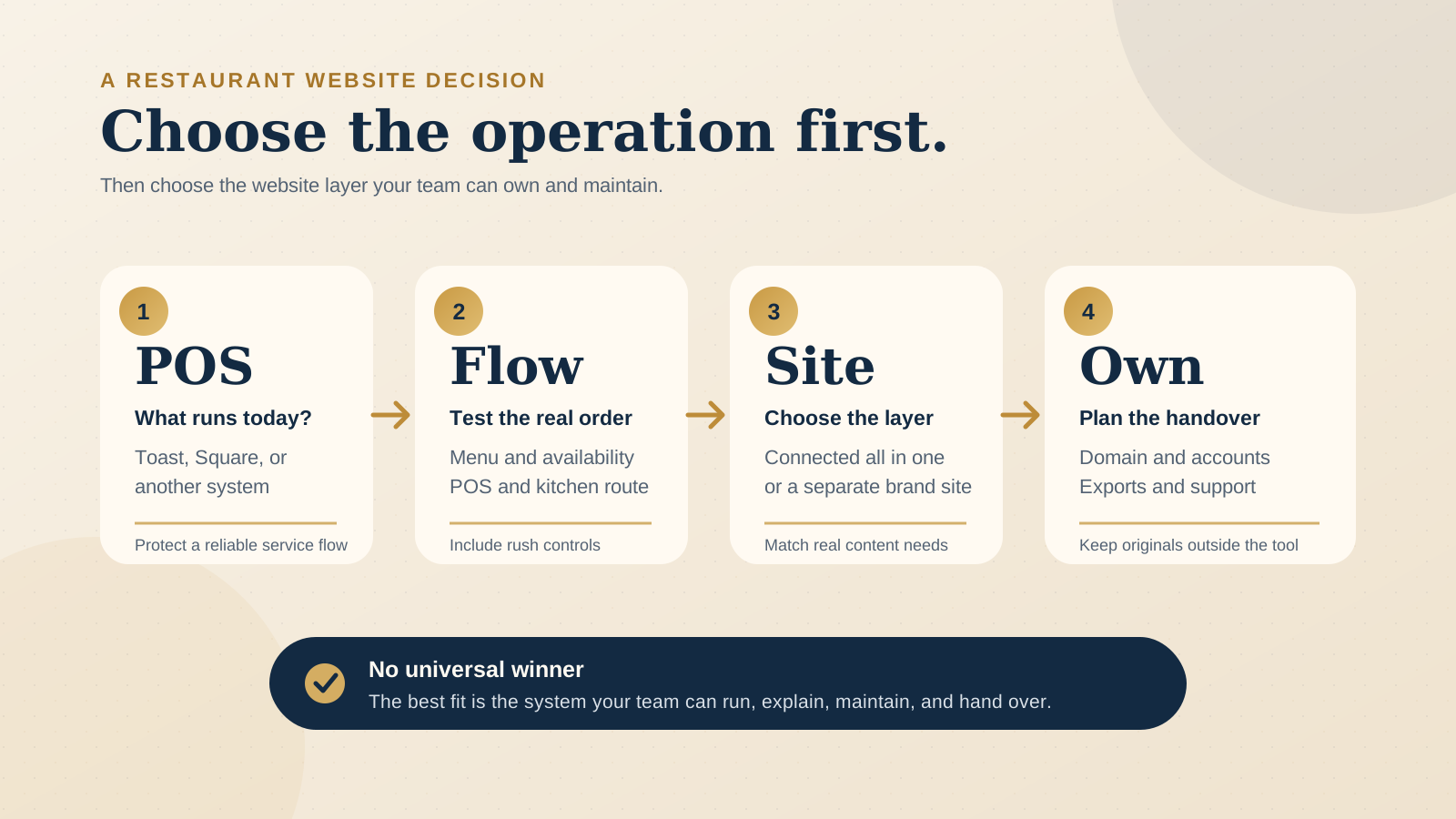
If your restaurant already runs reliably on Toast, begin by asking whether Toast Websites and Toast Online Ordering cover the guest journey you need. If it runs reliably on Square, begin with Square's connected ordering options. Replacing a working POS just to gain a different website builder can create a much larger operational change than the website problem requires.
That does not mean the POS must also own every page. A restaurant can keep its operational ordering layer and use a separate main website when the brand, editorial content, private dining, events, careers, press, accessibility, search structure, or multilingual content needs more room. The key question is not simply "Toast or Square?" It is "Which system should run the transaction, and which website layer should explain the venue?"
Review the actual account, plan, hardware, kitchen setup, and location structure before deciding. Product packaging and availability can change, and a feature shown on a product page may still require a particular setup.
Start with the POS already running the venue
The POS is where menu items, prices, availability, orders, payments, and service workflows meet. A website decision that ignores it can leave the team updating two menus, checking another tablet, or explaining why an unavailable dish can still be ordered online.
Toast says its website stays in sync with the Toast POS, including menu, pricing, and availability. Its website product also connects with Toast Online Ordering, Toast Tables, and Toast Catering. Square says its online ordering profile stays connected to Square POS, unifying menus, in person and online orders, and customer data in the Square system.
Those are meaningful benefits when the matching POS already runs the venue. They reduce the number of places where a routine operational change must be repeated. They are not, by themselves, a reason to switch the whole restaurant from one POS to the other.
Before comparing page templates, map what is live today:
- Menu source: where staff change items, modifiers, prices, taxes, and sold out status.
- Order destination: where an online order appears and who accepts or pauses it.
- Kitchen route: which printer, display, or station receives each item.
- Location rules: how menus, hours, prep times, and fulfilment differ by venue.
- Guest records: what data is collected, where it is stored, and who is allowed to use it.
Compare the complete ordering and kitchen flow
Both platforms promote first party online ordering connected to their own restaurant systems. Toast describes real time menus, order volume management, fulfilment choices, a multi-location picker, and integration with the POS and kitchen. Square says online orders flow through Square POS to a kitchen printer or Square KDS, with menus, prep times, fulfilment settings, and hours managed from Square Dashboard.
The useful comparison is therefore not whether either platform can put an "Order online" button on a page. Test what happens after the tap:
- Build a normal order Include modifiers, an unavailable item, tax, a tip, and the fulfilment methods you actually offer.
- Follow it into service Confirm where it appears at the counter and in the kitchen, which station receives each item, and how staff see the promised time.
- Change availability Mark an item unavailable in the operating system and check the live ordering view.
- Test pressure controls Confirm how the team adjusts prep times, pauses a channel, or manages order volume during a rush.
- Recover from a problem Check what the guest sees if a location closes early, a fulfilment method is unavailable, or an order cannot be accepted.
The restaurant online ordering guide helps separate the role of the owned ordering path from third-party discovery and delivery apps. For this choice, focus on how the direct order reaches your own team.
Treat multiple locations as an operating model, not a menu toggle
Toast lists a multi-location picker for online ordering. Square says its ordering profile works across locations, with guests choosing a location before ordering, and that customer information can sync across locations and sales channels.
A location selector is only the front door. Check whether each venue can have the correct menu, hours, prep time, pickup instructions, delivery area, taxes, and availability without forcing staff into risky workarounds. Then test how easily a guest can return to another location if they choose the wrong one.
The main website also needs a location structure that works beyond checkout. Each venue may need its own address, hours, directions, contact details, photos, booking link, service notes, and search friendly page. An ordering profile can be operationally strong while a separate content layer still does a better job of telling each location's story.
Decide how much freedom the website layer needs
Toast Websites is designed as a connected restaurant website product. Toast describes prebuilt pages, no-code editing, POS synced menu content, and connections with its ordering, tables, and catering tools. Toast Online Ordering also lists custom fonts, colors, and images, while its Pro offering lists hosting on a custom domain and additional templates and controls.
Square offers an online ordering profile that can stand alone or be linked from an existing website. Square's support guidance also explains how an ordering page can be added to a Square site or published separately and linked from a third-party site. It documents a Square branded subdomain, a custom subdomain, or another connected domain for that ordering page.
This creates several valid setups:
- Connected all in one setup: the platform manages the main website and the operational ordering path.
- Separate brand site with connected ordering: the main website carries the venue story and content, then links clearly to the platform's ordering experience.
- Ordering focused presence: a small cafe or takeaway venue uses the ordering profile as the primary digital destination because guests mostly need menu, hours, location, and checkout.
Judge website flexibility against real content, not a feature checklist. Can the venue publish the pages it needs, arrange them clearly, use the right photography, maintain accessible headings and link labels, measure important journeys, and keep the custom domain under the owner's control? Our guide to a restaurant website builder or custom website explores that layer in more detail.
Ask what guest data you can actually use
Toast says its online ordering data can show who orders, what they order, and how often they return, within the Toast platform. Square says its connected system unifies customer data and provides order history and loyalty information through a central directory across locations and sales channels.
Do not stop at the phrase "own your data." Ask what the restaurant can view, export, segment, retain, and use with appropriate consent. Confirm whether a guest is creating an account, joining loyalty, subscribing to marketing, or only placing an order. These are different actions and should be presented separately.
Also decide who inside the business should have access. A useful system still needs limited permissions, a process for departing staff, and a clear record of which account belongs to the owner rather than an agency or former manager.
Plan upkeep, portability, and handover before launch
A connected platform can make daily upkeep lighter because menu and availability changes come from the operating system. The tradeoff is that more of the public experience may depend on one vendor account and its current product rules. A separate website can provide more content freedom, but it creates another system that someone must maintain.
Name the owner of each routine change:
- Operations updates the POS menu, prices, modifiers, availability, prep times, and fulfilment settings.
- A manager checks hours, location details, ordering links, and seasonal notices on the main website.
- The website owner keeps domain registration, DNS access, analytics, images, copy, and service credentials documented.
- A named person tests the complete guest path after important menu or platform changes.
For handover, do not assume every page, design, menu record, customer record, or report can move cleanly to another system. Ask for the available export formats, account transfer process, domain release steps, cancellation effects, data retention terms, and support route in writing. Keep original photography and copy outside the platform, and keep the domain in an account the restaurant controls.
If menu updates involve both the POS and an editorial website menu, document which one is authoritative. The restaurant website CMS guide shows how to give staff safe editing paths without creating another unreliable menu.
Use this table to identify the better starting fit
| Your situation | Best starting point | What to verify |
|---|---|---|
| Toast already runs the menu, orders, and kitchen reliably | Test Toast's connected website and ordering options first | Required pages, brand controls, domain setup, plan features, and handover |
| Square already runs the menu, orders, and kitchen reliably | Test Square's ordering profile or ordering page first | Location logic, kitchen routing, domain choice, website depth, and handover |
| The operation is sound, but the site needs richer storytelling or content | Keep the connected ordering layer and compare a separate brand website | Mobile transition, consistent menu facts, analytics, ownership, and upkeep |
| You are choosing the POS and website together for a new venue | Run a real service workflow in both systems | Menu setup, modifiers, availability, rush controls, kitchen route, locations, support, and total contract |
Complete one real test before you choose
- Use the current menu and its difficult modifiers, not a demo menu.
- Place pickup and delivery orders on a phone, where those options exist.
- Watch each order travel through the POS and the real kitchen route.
- Change an item's price and availability, then inspect every guest facing view.
- Test the correct location, hours, prep time, and fulfilment rules.
- List every website page needed over the next year, including events, private dining, careers, press, and location pages.
- Confirm the custom domain owner, account administrators, billing owner, export options, cancellation effect, and handover steps.
- Record which claims came from a live test and which still depend on a proposal or plan.
The free Restaurant Website Quick Score can help you check whether the finished site makes the menu, ordering action, hours, contact details, and next step clear, whichever platform sits underneath.
Want a practical review before changing platforms?
The US$35 Website Check reviews the live mobile journey, menu and ordering path, essential venue details, visual clarity, and search basics. You receive a focused priority list so you can see whether the problem is the platform, the setup, or the website around it.
Get the US$35 Website CheckSources
- Toast, Online Ordering and Delivery System
- Toast, Restaurant Website Builder
- Square, Online Ordering for Restaurants
- Square Support, create an ordering page for your website
- Square for Restaurants