
The short answer is to shortlist by operating fit, then test the complete stay
Cloudbeds and Little Hotelier both describe connected tools for accommodation operators. Cloudbeds offers configurable plans, while its One plan combines a property management system, payments, marketplace, channel manager, and booking engine. Little Hotelier separates Basics and Pro on its official pricing page. It positions Basics for properties with 10 rooms or fewer and selected channel connectivity, while Pro is for larger properties, with broader connectivity and phone support.
Those published descriptions are useful starting points, not a property-specific verdict. Plan contents and availability can vary by region, and your setup may require particular payment, channel, website, or add-on terms. Confirm every decision-changing feature in a live demonstration and in the written quote for your property.
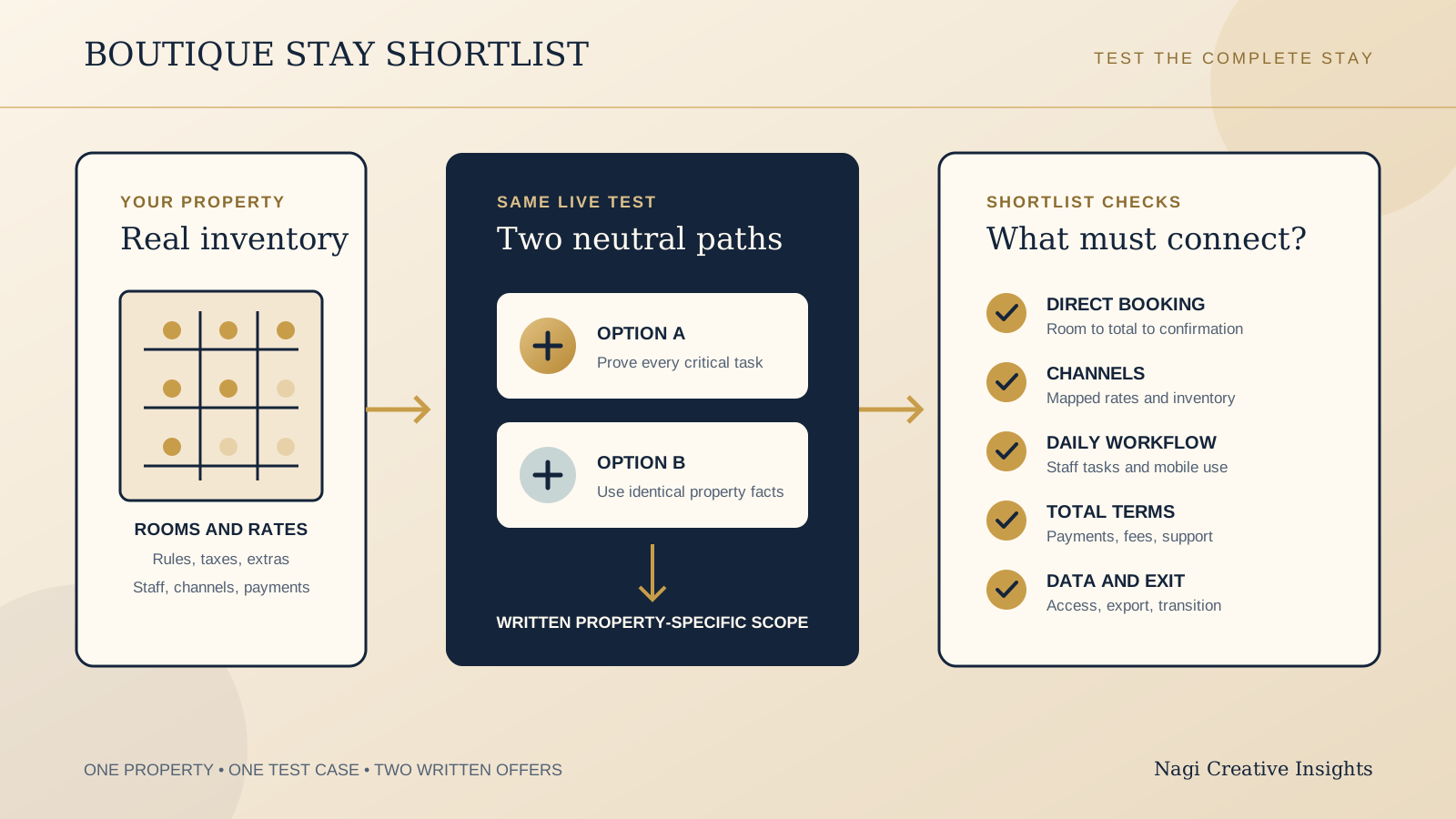
Use the same test case for both providers. Bring one real room type, a busy date, a two-night direct booking, an OTA booking, a cancellation, a payment question, and a staff handover. A practical shortlist should reveal which system creates the fewest risky gaps for your actual team.
Start with property size and operating complexity
Room count matters, but it is not the whole property. A six-room inn with packages, seasonal rates, several OTAs, owner-managed payments, and frequent room moves may be more operationally complex than a larger property with one simple rate plan. List the work the system needs to carry before comparing plan names.
For each platform, map your room types, physical rooms, occupancy rules, rate plans, taxes, restrictions, minimum stays, extras, packages, group needs, and any separate accommodation buildings. Ask the provider to set up a small sample from your real inventory. If the demonstration depends on simplifying away the part your staff struggles with, it is not testing the fit.
Little Hotelier's published distinction between Basics and Pro gives very small properties a clear place to begin the conversation. Cloudbeds' configurable approach gives owners a reason to ask exactly which components are included in the proposed plan. Neither point decides the outcome by itself. The right scope is the smallest one that supports today's work without blocking the next planned stage of the property.
Follow the staff workflow, including mobile operations
Ask the person who handles arrivals, messages, payments, housekeeping status, and late changes to join the demo. Have them find today's arrivals, open a reservation, change dates, move a room, record a note, take or confirm a payment, mark a room ready, and hand the shift to another person.
Little Hotelier describes mobile operations among its product capabilities. Verify which tasks your chosen plan, device, and country support, then test them on the phone your team would actually use. For Cloudbeds, ask the same practical mobile questions rather than assuming that a desktop capability behaves identically on a smaller screen.
Watch the number of screens, permissions, repeated entries, and workarounds required. A system is not simpler because it has fewer menu items if the owner still needs a spreadsheet, private message thread, or paper diary to finish the day. Record who can see sensitive guest and payment information, and how quickly access can be removed when a staff member leaves.
Test the direct booking and website handoff as one guest journey
Cloudbeds describes a branded booking engine designed to accept direct reservations. Little Hotelier describes a hotel booking engine that can connect the property's website to online bookings, and its pricing page also describes a website builder. The important question is how the offered version behaves with your rooms, rates, policies, language needs, and website.
Start on your live website using a phone. Open a room page, choose dates and occupancy, continue to availability, compare rate conditions, add an extra where relevant, review the total, reach payment, and read the confirmation. Check whether the property name, room choice, currency, taxes, required fees, cancellation terms, and contact route stay clear through the handoff.
Ask who controls the colours, text, photographs, policies, analytics, domain or subdomain, and tracking consent around that journey. Confirm what the guest sees when no room is available, a payment fails, or the session expires. Our boutique hotel direct booking guide explains how the owned site, live booking engine, OTAs, and other booking routes should work together. The boutique hotel room page checklist helps you test whether the website passes the right room context into availability.
Match the channel manager to the channels you genuinely use
Cloudbeds describes real-time inventory and rate synchronisation across connected channels. Little Hotelier describes channel management within its plans, with the pricing page distinguishing selected connectivity in Basics and broader connectivity in Pro. Ask both providers to name the exact channels and connection type available for your plan, country, and property.
Do not score a longer channel list automatically as better. Start with your live OTA and distribution mix, then include channels you are realistically adding. Verify room and rate mapping, taxes, restrictions, minimum stays, stop-sell controls, modification handling, cancellations, guest messages, payment details, and how quickly inventory returns after a cancellation.
Run one controlled inventory test. Reduce the last available room on a busy date, confirm the change reaches every connected channel, create a test booking through one channel, and check the other channels plus the direct engine. Ask what happens during an outage, how reconciliation works, and who the team contacts when availability does not match.
Compare written totals, payments, and booking fees
Cloudbeds uses quote based pricing. Little Hotelier pricing depends on plan, room count, country, taxes, booking fees, payments, and add ons. Avoid comparing a remembered headline or a page localised for another market. Obtain written, property-specific totals from both providers.
Ask each quote to separate the subscription, implementation or onboarding, booking engine charges, channel connections, payment processing, booking fees, hardware if any, add ons, premium support, messaging or marketplace services, contract term, taxes, and cancellation conditions. Confirm the currency and whether a percentage applies to the booking value, payment value, or another base.
Then model three real periods: a normal month, your peak month, and a quieter month. Use your expected direct and OTA booking mix, average stay value, refund pattern, and payment methods. Compare cash timing too. Ask when funds arrive, how deposits and balances are recorded, how refunds and chargebacks are handled, and what staff must reconcile outside the platform. This is an operating cost exercise, not a promise that one option will always cost less.
Ask what support and onboarding look like after the sales call
Little Hotelier's official pricing page distinguishes support by plan and lists phone support with Pro. For both providers, verify the support routes, hours, languages, response expectations, escalation path, and country coverage included in your written offer. A support badge is less useful than knowing what happens when check-in is close and inventory or payment status looks wrong.
Request an onboarding plan with names and responsibilities. It should cover property setup, room and rate mapping, channel connection, payment configuration, website handoff, data migration where offered, staff training, test bookings, launch timing, and the first reconciliation. Ask which tasks belong to the provider, the owner, the website partner, and each OTA.
Choose a launch window that leaves time to compare live results before a peak arrival day. Define the rollback or manual continuity plan if one connection is delayed. After launch, nominate an owner for rates, permissions, billing, booking content, and routine system checks.
Clarify data ownership, access, and exit before signing
Ask what reservation, guest, payment, message, rate, invoice, and reporting data the property can access and export. Confirm the available format, whether attachments or notes are included, how long exports take, and what remains available after notice or cancellation. Ask where the data is processed, which subprocessors or connected services matter to your setup, and which privacy responsibilities remain with the property.
Keep the main account, billing authority, domain, original photography, room copy, policy text, and integration credentials under business control. Use individual staff accounts where available. Record how to change an administrator, remove access, recover the account, and transfer responsibility if the manager or website partner changes.
For exit, obtain the notice period, final billing treatment, channel disconnection sequence, future reservation handling, payment and refund responsibilities, data export route, booking engine removal steps, and support available during transition. The ownership questions in who should own a hospitality website's domain and hosting use a restaurant example, but the account control and handover principles apply to a boutique stay too.
Use this comparison table to plan the next test
| Decision area | Cloudbeds starting point | Little Hotelier starting point | What to prove |
|---|---|---|---|
| Plan fit | Configurable plans, with One combining PMS, payments, marketplace, channel manager, and booking engine | Basics is aimed at properties with 10 rooms or fewer, while Pro is positioned for larger properties | Exact included features, limits, country availability, and add ons in the written offer |
| Direct booking | Branded booking engine | Booking engine and website tools described across its offering | Your room, rate, policy, total, payment, mobile handoff, and failure path |
| Channels | Channel manager describes real-time inventory sync | Basics lists selected connectivity, while Pro lists broader connectivity | Your exact channels, mapping, restrictions, sync timing, and outage process |
| Daily operation | Test the proposed connected setup against every shift task | Mobile operations, payments, insights, and other capabilities are described by the provider | Tasks, devices, permissions, support, and region-specific plan access |
| Commercial terms | Quote based pricing | Pricing varies with plan, room count, country, taxes, booking fees, payments, and add ons | Written property-specific total, contract, payment flow, onboarding, and exit terms |
Run one precise live sandbox test before choosing
- Prepare the same property sample: one real room type, two physical rooms, occupancy rules, two rate plans, taxes, a minimum stay, cancellation terms, one extra, and one sold-out date.
- Create inventory: map the sample to the direct booking engine and the exact OTA channels you use or genuinely plan to add.
- Book direct on a phone: start from your room page, choose dates and guests, compare conditions, add the extra, review the full total, complete the test payment step, and inspect confirmation.
- Book through a channel: make a controlled OTA test, then confirm inventory changes across the property system, direct engine, and other connected channels.
- Run the front desk tasks: change dates, move a room, add a note, record a payment, refund where the sandbox permits it, mark housekeeping status, and hand the reservation to another staff account.
- Test a failure: simulate no availability, a cancelled booking, a payment problem, a sync delay, and a staff member without the right permission. Record the guest message and the recovery route.
- Inspect the records: find the booking source, charges, taxes, payment status, modification history, guest details, and an export your property would rely on.
- Call support: use the route included in the proposed plan, ask one property-specific configuration question, and record the hours, handoff, and escalation process.
- Reconcile the quote: mark every demonstrated function as included, add on, usage based, country dependent, or still unconfirmed. Attach the property-specific total and exit terms.
- Score the fit: let the owner, a daily operator, and the website contact score the same test separately before agreeing on the shortlist.
Do not choose from a sales deck alone. Keep screenshots or notes from the sandbox, the final scope, the written commercial terms, and the unanswered questions in one decision record. If a feature is important but could not be tested, treat it as unconfirmed.
Run a restaurant or cafe alongside your stay?
The US$35 Website Check is designed for restaurant and cafe websites, not hotel room pages or booking systems. If your property also has a restaurant or cafe with its own website, the check can review that guest journey. For rooms and reservations, use the comparison and sandbox checklist above, then ask each booking provider to verify the live setup in writing.
See the US$35 restaurant and cafe Website CheckSources
- Cloudbeds, pricing
- Cloudbeds, booking engine
- Cloudbeds, channel manager
- Little Hotelier, pricing
- Little Hotelier, hotel booking engine
Official product pages checked October 7, 2026. Product details can vary by region, plan, and property setup. Confirm current terms directly with each provider.