
The short answer is to match the policy to the risk
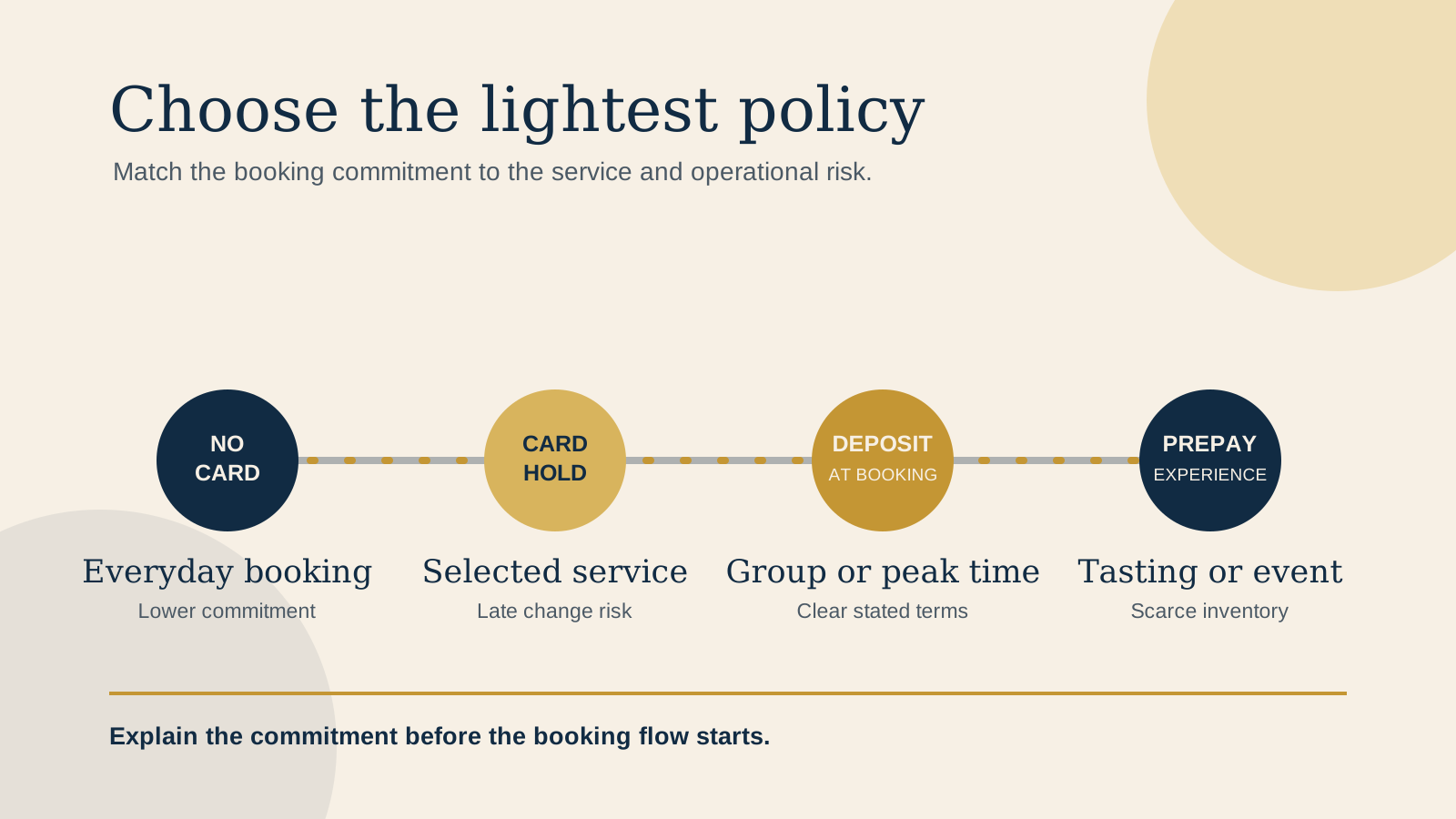
Most venues do not need the same rule for every table. A regular lunch booking with flexible capacity may only need a clear confirmation. A small tasting menu, large party, special event, or service with very limited inventory can create a different risk when a guest cancels late or does not arrive.
Start with the cost of an empty place and how difficult it is to resell. Then choose the lightest policy that protects the service without adding unnecessary friction. The policy remains the venue's decision. Before publishing it, check applicable law and the terms of your payment processor and reservation platform.
Know the policy options before naming one
No card
The guest reserves without payment credentials or payment in advance. This can fit everyday services where a late change is manageable.
Card hold or cancellation-fee setup
The booking flow collects payment details for the stated purpose and may charge only when the agreed late-cancellation or no-show condition occurs. A card hold is not money collected at booking. Guests should see the trigger, timing, and charge basis before they confirm.
Deposit
A deposit is money collected when the booking is made and handled under the stated policy. Say whether it is applied to the final bill, refunded when a guest changes plans within the deadline, or handled another way under the published terms.
Prepayment
Prepayment collects the experience price ahead of the visit. It can fit a defined tasting menu, ticketed dinner, or special event. It is different from a deposit, so guests should know what is included and what happens if plans change.
Resy describes selective prepayment, deposits, and card holds, including configurations by party size or high-demand experience. OpenTable describes configurable deposits and experiences that can use full payment, partial payment, or a deposit. Those settings make a service-by-service approach possible, but do not decide the venue policy for you.
Use a policy selectively, not as a reflex
Ask what is genuinely hard to recover. It may be a table during a short peak seating, a long preparation commitment for a tasting menu, seats reserved together for a large group, a special event, or another scarce inventory moment. Those cases can justify a more deliberate commitment than a regular booking.
A venue may choose no card for ordinary bookings while using a card hold for a high-demand dinner, a deposit for a group, and prepayment for a ticketed event. Write the internal decision down before drafting website copy. Name the services and party sizes it applies to, who can approve an exception, and what staff should do when a guest calls.
Explain the policy before a guest leaves your website
Put a short, plain-language policy note near the relevant booking action, not only in a footer or general terms page. It should make the commitment visible when a guest decides whether to continue.
For each service using a card hold, cancellation fee, deposit, or prepayment, the website disclosure should include:
- When the policy applies, including service, date type, party size, or another clear condition.
- The exact amount or calculation basis.
- Whether a deposit is applied to the bill, refunded, or handled under another stated outcome.
- The cancellation or modification deadline, including the timezone.
- How a no-show or late arrival is handled.
- The method for cancelling or changing a booking.
- Refund timing where relevant.
- A working contact route for help before the deadline.
The exact policy must also appear in the booking platform before confirmation and remain consistent with confirmation messages. Resy says payment requirements appear on its reservation page, while restaurant cancellation timing and fees appear on both the reservation page and confirmation. OpenTable's materials describe clear disclosure during booking and before an experience purchase. The website note is the helpful first explanation, not a replacement for the confirmation flow.
Keep every booking message consistent
Check the website, booking-platform service description, booking screen, confirmation, reminder, and staff call script. The wording can be shorter in some places, but the service, amount or calculation, deadline, timezone, and outcome should not conflict.
Set a named policy owner, such as the owner or reservations manager. That person should update the website note, platform setting, confirmation text, and staff guidance together when a service, season, or event changes. Keep one internal source document with the current policy and last review date.
Test the full mobile path before publishing a policy change
Read the policy on a phone, then follow the exact live journey through the external reservation flow. Use mobile data if possible and test a service that actually uses the rule.
- Find the action Start on the homepage, menu, and relevant service page. Confirm the policy note appears before the booking action.
- Read the commitment Check that the amount or calculation, deadline, timezone, refund outcome, late-arrival handling, cancellation method, and contact route are readable.
- Enter the flow Choose the relevant service, party size, date, and time. Confirm the platform repeats the exact policy before confirmation.
- Try a change Follow the visible change or cancellation route without completing a live charge, unless you have an approved test process.
- Check the message Review the confirmation and reminder against the website note.
- Record the result Have the policy owner note the device, service, date, and issues found.
Use the free Restaurant Website Quick Score as a companion check for the booking path, menu, contact details, and other decision points in that mobile journey.
Make the next decision calmly
Start with one service, not a universal policy. If a no-show is hard to recover because the service is high-demand, for a large party, a tasting menu, a special event, or another scarce inventory moment, choose the lightest option that reflects that risk. If the service can absorb a late change, a lower-friction path may still be the better guest experience.
Then test the words, not only the configuration. Guests should understand what they will pay or authorise, when they can change plans, what happens when they arrive late, and how to ask for help before final confirmation.
Want a practical review of the booking journey?
The US$35 Website Check reviews your live mobile journey, booking path, menu, essential venue details, visual clarity, and search basics. You receive a focused priority list for clearer policy copy, a smaller booking-flow repair, or a broader website improvement.
Get the US$35 Website CheckSources
- Resy, reservations tools for restaurants
- Resy, reservation and payment terms
- OpenTable, restaurant deposits guidance
- OpenTable, Experiences terms