
The short answer is to measure guest actions before you buy more visits
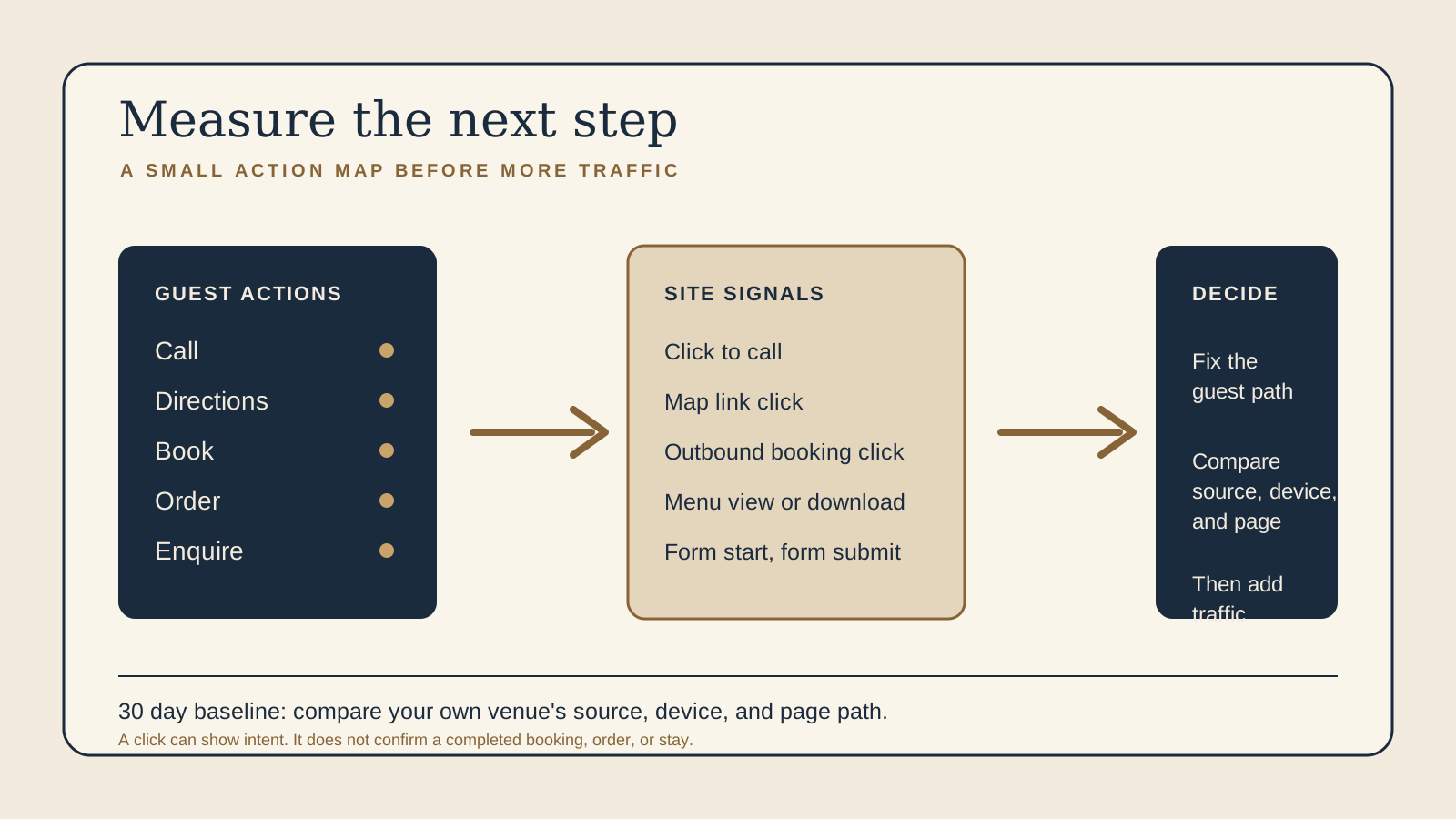
More traffic is not automatically more useful. If a guest cannot find the menu, a booking path is unclear, or a phone number is difficult to tap, sending more people to the same page may simply make the uncertainty larger. First, find out which parts of the current journey invite action and which pages leave a guest with nowhere obvious to go.
Page views are context, not the goal. They can tell you that a page was seen, but not whether it answered a guest's question or led to a completed reservation, order, or stay. A better starting point is a small action map that reflects what your own venue actually offers.
Build a small action map around the ways guests can move forward
Write down only the actions that matter to the venue. A cafe that takes walk ins may care about a tap to call, directions, hours, and menu views. A restaurant with reservations may add a booking button. A venue offering delivery or pickup may add an ordering path. A boutique stay may replace restaurant ordering with a stay booking engine. Do not add actions simply because another business has them.
Useful actions can include a phone tap, directions link, booking button, ordering button, menu page view or download, gift card link, private dining or catering form start, and private dining or catering form submit. The point is not to create a large dashboard. It is to understand whether people are reaching the practical next steps your site promises.
For each path, note the page where it begins, the action a guest takes, and where they go next. That makes it easier to spot a page that gets attention but does not offer a suitable next step. It also keeps later reporting connected to a real owner decision, rather than a list of numbers with no operational use.
Know what enhanced measurement can observe on the real site
Google Analytics automatically collects page views through page_view. Enhanced measurement can collect scroll, outbound click events, site search, file downloads, and form interactions when the relevant options are enabled. Its documented form interactions include form_start and form_submit. A scroll event reflects a 90 percent page depth, which can be a useful reading signal, not proof that a guest understood or acted on the page.
Enhanced measurement can also detect an outbound link or a button click that takes a guest to another domain. Reports can use destination information such as link domain and link URL. This is useful for a reservation platform, ordering platform, gift card checkout, map service, or external booking engine. The setup still needs to be checked against the real website. A button that looks right, changes destination, or is implemented differently may not produce the event you expect.
Use this information as a starting point, not a substitute for testing. Open the site on a phone, follow the actual booking, ordering, calling, directions, and enquiry paths, then confirm that the observed event matches the intended action. If a path is important but not observable in the existing setup, define a clear underlying event before making a decision from it.
Be exact about the difference between a click and a completed business outcome
A click to a third party reservation or ordering platform shows that a guest left the website for that path. It does not confirm that they found a time, completed a booking, placed an order, paid, arrived, or stayed. The same applies to a stay booking engine. The website can observe the handoff, while the external platform is where the actual transaction or reservation process continues.
A menu page view or menu download is also an intent signal, not revenue. It can help an owner see which menu or page is being sought, especially when compared with the traffic source and page path. It cannot say what a guest ordered, how much they spent, or whether they visited in person.
Forms need the same care. form_start means a guest began interacting with a form. form_submit means the website observed a submission event. Treat these as different steps. A submitted private dining or catering enquiry may still need a staff reply, qualification, date check, and agreement before it becomes a booking. Do not report it as completed revenue.
Mark only meaningful business actions as key events after the event is defined
First define or identify the underlying event. Then decide whether that event represents a meaningful action for the business and should be marked as a key event. A phone tap or successful enquiry submission may deserve that treatment for one venue. A routine scroll or every menu page view usually does not need to sit in the same category.
The aim is focus. A short set of key events makes an owner's reporting easier to read and reduces the temptation to treat every interaction as success. Keep ordinary events available for diagnosis. They can explain why a guest did not reach a key action, such as a menu page that is read but has no visible booking or order route.
Match each guest action to what the website can observe and the decision it informs
- Phone tap The site can observe a click on a tap to call link. It cannot confirm that the call connected, was answered, or became a reservation. This helps an owner decide whether prominent phone access is being used on pages where guests need a quick question answered.
- Directions link The site can observe a click to a map or directions service. It cannot confirm a visit. This helps decide whether location and arrival information are easy to find, particularly on mobile.
- Reservation path The site can observe a click to a third party reservation platform or booking engine. It cannot confirm a completed booking. This helps decide whether the booking handoff is clear and which page or traffic source starts that handoff.
- Ordering path The site can observe a click to an ordering platform. It cannot confirm a completed order or payment. This helps decide whether guests can find the ordering route and whether it suits the pages where they begin.
- Menu interest The site can observe a menu page view, file download, or scroll. It cannot confirm a meal purchase or a visit. This helps decide which menu format and menu entry point guests use before another action.
- Gift card path The site can observe a click to a gift card checkout. It cannot confirm checkout completion. This helps decide whether the offer is discoverable at the moments a guest is likely to consider it.
- Private dining or catering enquiry The site can observe
form_startandform_submitseparately. It cannot confirm an accepted event, payment, or completed function. This helps decide whether the form is causing friction and whether staff should review the follow up process. - Stay booking path For a boutique stay, the site can observe a click to a booking engine. It cannot confirm a completed stay booking. This helps decide whether room pages and availability handoffs lead guests to the right next step.
There is no need for every venue to track every row. Keep the list tied to the service you provide. A clear, limited map is more likely to be reviewed and acted on than a broad setup that no one trusts.
Build a 30 day baseline before changing traffic, copy, or a guest path
Give the current site a 30 day observation period once the essential events are checked. Record what the site is showing now, then compare future changes against the venue's own baseline. Do not invent a universal target, because a breakfast cafe, dinner restaurant, catering business, and boutique stay can have very different paths and decision cycles.
- Check the action map first: test each relevant link or form on the live site and make sure events have names you can recognise later.
- Read actions with their source: compare direct, search, social, email, or paid campaign traffic only where the source is known. A rise in visits from one campaign does not explain itself without the next action.
- Compare devices: separate phone and desktop behaviour. A booking handoff that is easy on a laptop may be difficult on a phone.
- Compare page paths: look at the pages that lead into a booking, call, directions, menu, or enquiry action. This shows where guests begin, not only where they leave.
- Keep a small change log: note when a call to action, menu, form, or traffic source changes so a later comparison has context.
- Choose one question at a time: for example, whether mobile visitors can find the booking handoff from the menu page. Use the result to guide the next practical improvement.
This is a working baseline, not a declaration that a pattern is statistically significant. It gives an owner a grounded way to decide whether the current guest journey needs attention before more budget is put into attracting additional visitors.
Keep personal information out of analytics event values
Do not collect names, email addresses, free text, reservation details, phone numbers, room details, dietary notes, or other personal data as analytics event values. Google Analytics documentation says that personally identifiable information must not be collected. Events should describe the interaction, such as a booking link click or a form submission, without copying what a guest typed or identifying the guest.
Check the real setup, including form tools, link parameters, and any custom event labels. If an event could pass personal information, stop and correct it before using the reporting. A small, privacy conscious action map is enough to support useful operational decisions.
Use the free Restaurant Website Quick Score to look at the guest essentials before you add reporting or spend more on traffic. It helps you check whether people can find the menu, location, contact details, and next action that the action map depends on.
Want a practical check of the guest path before you pay for more traffic?
The US$35 Website Check reviews the live mobile journey, menu or stay information, booking or enquiry path, essential venue details, visual clarity, and search basics. You receive a focused priority list so the actions you measure are connected to a website guests can actually use.
Get the US$35 Website CheckSources
- Google Analytics Help, Enhanced measurement events
- Google Analytics Help, Measure outbound clicks
- Google Analytics Help, Conversions versus key events