
The short answer is identity, difference, place, proof, and action
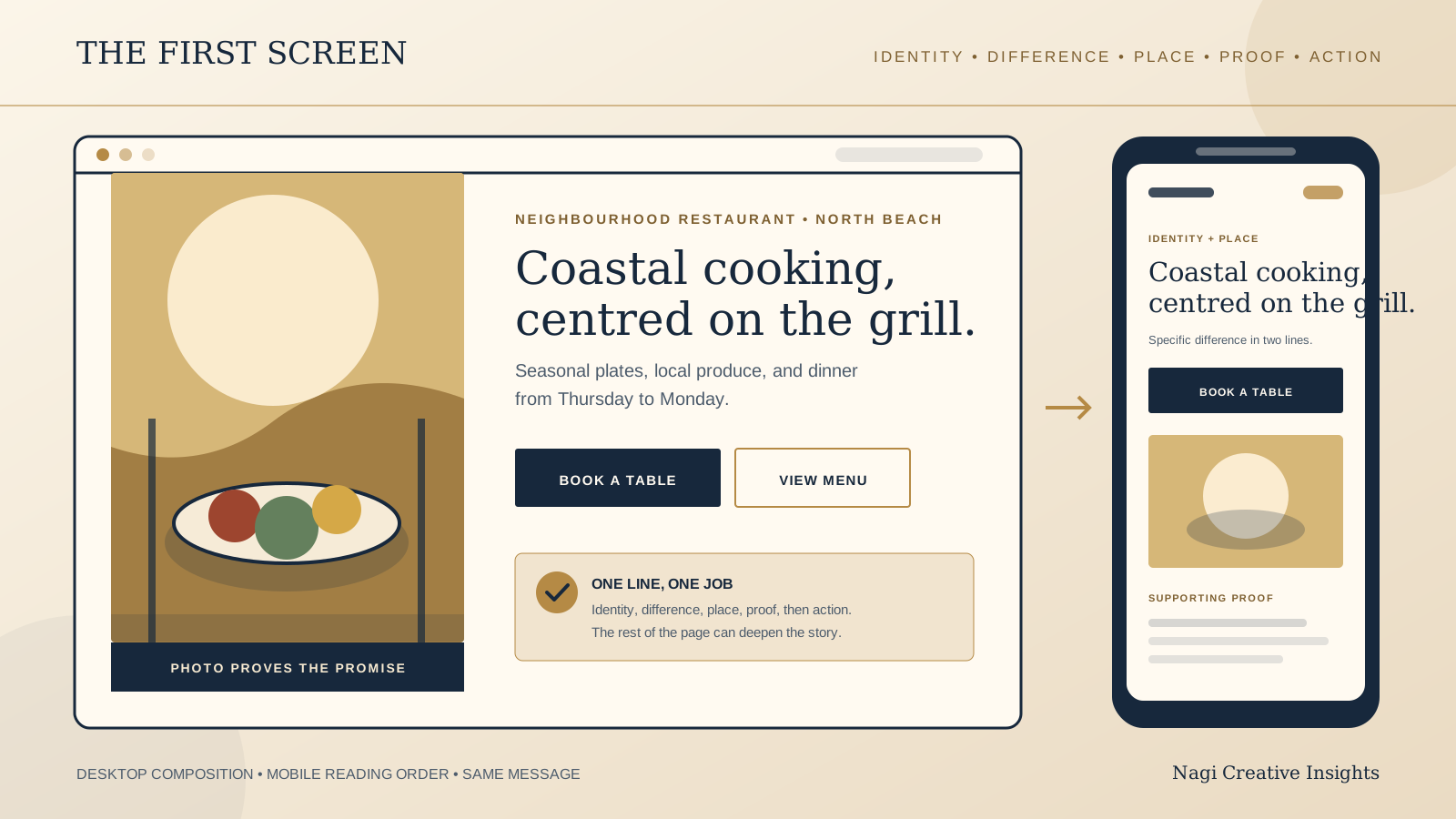
A guest should not need to decode a slogan before learning what kind of place they have found. Start with a clear venue identity. Follow it with one specific reason to choose the venue, enough location context to establish relevance, a small piece of proof, and a button that names the next step.
For a neighbourhood restaurant, that may mean cuisine, service style, neighbourhood, a signature strength, and a reservation action. For a cafe, it may mean what is served, when the venue is useful, the street or area, and a menu or directions action. For a boutique stay, it may mean property type, setting, the character of the stay, and a check availability action.
The goal is not to fit the whole business above the fold. It is to remove the first layer of uncertainty. Once a guest understands the place and sees a relevant next step, the rest of the homepage can earn attention with menus, rooms, atmosphere, details, and stories.
Build the first screen in a deliberate message hierarchy
Use this order as a starting point. The image and copy can sit side by side or overlap, but the meaning should remain clear when the design collapses into one column.
- Venue identity: Say what the place is in language a first time guest understands. Include the restaurant, cafe, bar, guesthouse, or boutique hotel type when the brand name does not explain it.
- Useful difference: Name the cuisine, service occasion, setting, room character, or operating idea that actually shapes the visit. Choose a difference the venue can prove on the page.
- Place: Add the neighbourhood, town, or destination if location helps a guest decide whether the venue is relevant. The exact address can sit lower if the area is enough for this first decision.
- Proof: Support the message with one current, verifiable fact or a photograph that shows the claim. Do not rely on an unsupported superlative.
- Primary action: Give the guest one button for the most important next step, such as view the menu, book a table, get directions, or check availability.
The brand name and logo usually sit in the header, so the main heading does not always need to repeat them. It does need to tell the guest what this page is about. A poetic line can still appear, but it should support the clear message rather than replace it.
Check the first screen without the lead photograph. If the words no longer identify the venue, the image is carrying too much meaning. Then check it with the copy hidden. If the photograph could belong to any restaurant, cafe, or stay, choose a more specific image.
Use a practical copy formula, then make it sound like the venue
A useful working formula is: [venue type or defining offer] in [place], known for [specific, supportable difference]. [Primary action]. This is a drafting tool, not a sentence that every venue should publish word for word.
A restaurant draft might read: “Seasonal coastal cooking in North Beach, centred on the charcoal grill and produce from nearby farms.” A cafe might use: “A corner cafe in Burleigh Heads for early coffee, house baked pastries, and an unhurried breakfast.” A small stay might use: “Six quiet rooms in a restored town house, two minutes from the old harbour.”
Replace any fact that is not true, current, or important to the guest. “Family owned since 1998” can be meaningful if the family and continuity shape the experience. It is less useful when it sits alone and leaves the visitor unsure what the venue serves. Likewise, naming a local supplier matters only when the relationship is real and the ingredient or practice is visible in the experience.
Read the line aloud. Remove phrases that sound polished but could describe fifty other venues. Words such as elevated, unforgettable, authentic, unique, and exceptional need concrete support. Often the detail is stronger than the adjective.
Turn broad claims into useful guest information
Weak homepage copy often sounds confident while answering very little. Useful copy gives the guest a picture they can test against the menu, photography, location, and next action.
- Weak: “An unforgettable dining experience.” More useful: “Wood fired seafood and shared plates by the marina, served for dinner from Thursday to Monday.”
- Weak: “Passion in every cup.” More useful: “Espresso, Japanese sandos, and pastries baked here each morning, one block from the beach.”
- Weak: “Luxury redefined.” More useful: “Eight calm rooms in a former merchant house, with breakfast in the courtyard and the market five minutes away.”
- Weak button: “Explore.” More useful button: “View the dinner menu,” “Book a table,” or “Check room availability.”
These examples are structures, not claims to borrow. Your copy should come from the real service, menu, rooms, setting, and guest questions. A plain accurate line is more valuable than a distinctive sounding promise that the page cannot support.
Put proof close to the promise
Proof does not need to mean awards or a row of ratings. The strongest first screen proof is often a current photograph that shows the space, food, room, or view named in the copy. It can also be a clear service fact, a short menu detail, a verified history, or a specific operating practice.
If the heading promises a charcoal grill, the image or nearby menu link should make that real. If the stay is described as quiet, explain the setting or room position that supports the claim. If the cafe is useful for early commuters, show the correct opening time where the visitor can confirm it.
Use reviews carefully. A short excerpt can support a point when it is real, current, accurately attributed, and permitted for the intended use. It should not be edited into a broader claim than the guest made. Avoid ratings or review counts that nobody is responsible for keeping current.
Proof can continue below the first screen. The important part is that the opening promise leads into evidence rather than a second set of vague claims. The guest should feel that the homepage is revealing the place, not continually advertising it.
Choose one primary action and write the button literally
The main button should match what the venue wants a ready guest to do. A reservation led restaurant can use “Book a table.” A walk in cafe may be better served by “View the menu” or “Get directions.” A boutique stay usually needs “Check availability” rather than a general “Discover more.”
Keep secondary actions available without making them compete. A restaurant can show “View menu” beside a stronger booking button. A cafe can keep ordering in the header while leading with directions. A stay can offer room details beneath availability. Use visual hierarchy to show which action is primary.
The button label must match the destination. “Book a table” should open a reservation path, not a general contact page. “View menu” should reach the current menu, not an image gallery. If an external service opens, keep the venue, selected location, and action recognisable after the click.
Set the mobile reading order before polishing the desktop composition
On a phone, the guest will receive the page in a strict sequence. Test the actual order, not just the visual balance of the desktop design. A reliable sequence is logo and essential navigation, venue identity, useful difference, place, primary action, supporting image or proof, then the first details needed for the next decision.
Do not let a tall photograph, announcement bar, or decorative word push the identity and action several screens down. If the photograph needs to lead, make sure the overlaid text stays readable across real crops and does not disappear over a bright area. Test the smallest supported screen, larger text settings, slow image loading, and the page with images disabled.
Keep the opening paragraph short enough to scan, but do not reduce it to fragments that lose meaning. Avoid placing essential copy inside the image file because it may crop, scale poorly, and become unavailable to people using assistive technology. For a full phone journey test, use the restaurant website mobile UX checklist.
Keep the visible title and search context aligned
The homepage copy should be written first for the guest, but its main title should also agree with the page title and the venue identity used elsewhere on the home page. Avoid a browser title full of repeated keywords while the visible page opens with an unrelated slogan.
Google explains that title links in search results are generated automatically from several possible sources. These can include the HTML title, the main visual title, headings, prominent text, link text, and other page or web signals. That means you can make the page clear and indicate a preference, but you cannot guarantee the exact title link Google will show.
Google also treats the site name as separate from the title of an individual page. Its site name system is automated and can consider the home page, references elsewhere, structured data, the title, headings, and other home page text. Use the venue name consistently, and do not force the whole venue description into every heading.
Clarity is the practical goal. Use one distinctive main heading, concise title text, the same primary language as the page, and a consistent venue name. These choices help guests and give search systems coherent information. They do not promise a particular display or ranking.
Run this homepage copy check before launch
- Identity: Can a first time visitor tell whether this is a restaurant, cafe, bar, guesthouse, or boutique stay?
- Offer: Does the first screen name the cuisine, service, stay, or occasion in concrete language?
- Difference: Is the main claim specific, true, current, and supported by the page?
- Place: Does the guest get enough location context to know whether the venue is relevant?
- Proof: Does a photograph, fact, menu detail, or verified piece of history support the opening promise?
- Action: Is there one obvious primary button, and does its label accurately describe the destination?
- Secondary path: Can a guest still reach the menu, directions, ordering, room details, or contact route that matters next?
- Mobile order: Do identity, difference, place, and action appear in a useful sequence on a small phone?
- Image independence: Does the message still make sense if the lead image is slow or unavailable?
- Search alignment: Do the page title, main heading, venue name, and visible copy describe the same business without repetition?
- Freshness: Are hours, service days, neighbourhood, menu references, and other changeable facts current?
- Ownership: Does one person know when the homepage needs updating and who can approve the change?
Test with someone who has not seen the draft. Give them five seconds on the first screen, then ask what the place is, where it is, why someone might choose it, and what they would click next. Treat a confused answer as a copy or hierarchy issue, not as a failure by the reader.
Start with the free Restaurant Website Quick Score
For a restaurant or cafe homepage, the free Restaurant Website Quick Score checks nine guest essentials and returns three practical priorities. Use it on the live site before rewriting, so the new opening message fits the menu, contact details, location, mobile experience, and next action around it.
Want a focused review of the whole first visit?
The US$35 Website Check is for independent restaurant and cafe websites. It reviews the mobile journey, menu, booking or ordering path, essential venue details, visual clarity, and search basics. If your boutique stay also runs a restaurant or cafe with its own guest journey, the check can review that part of the business. It does not audit hotel booking systems.
Get the US$35 Restaurant Website CheckSources
- Google Search Central, Influencing your title links in search results
- Google Search Central, Provide a site name to Google Search