
The short answer is to prepare decisions, facts, and responsibilities
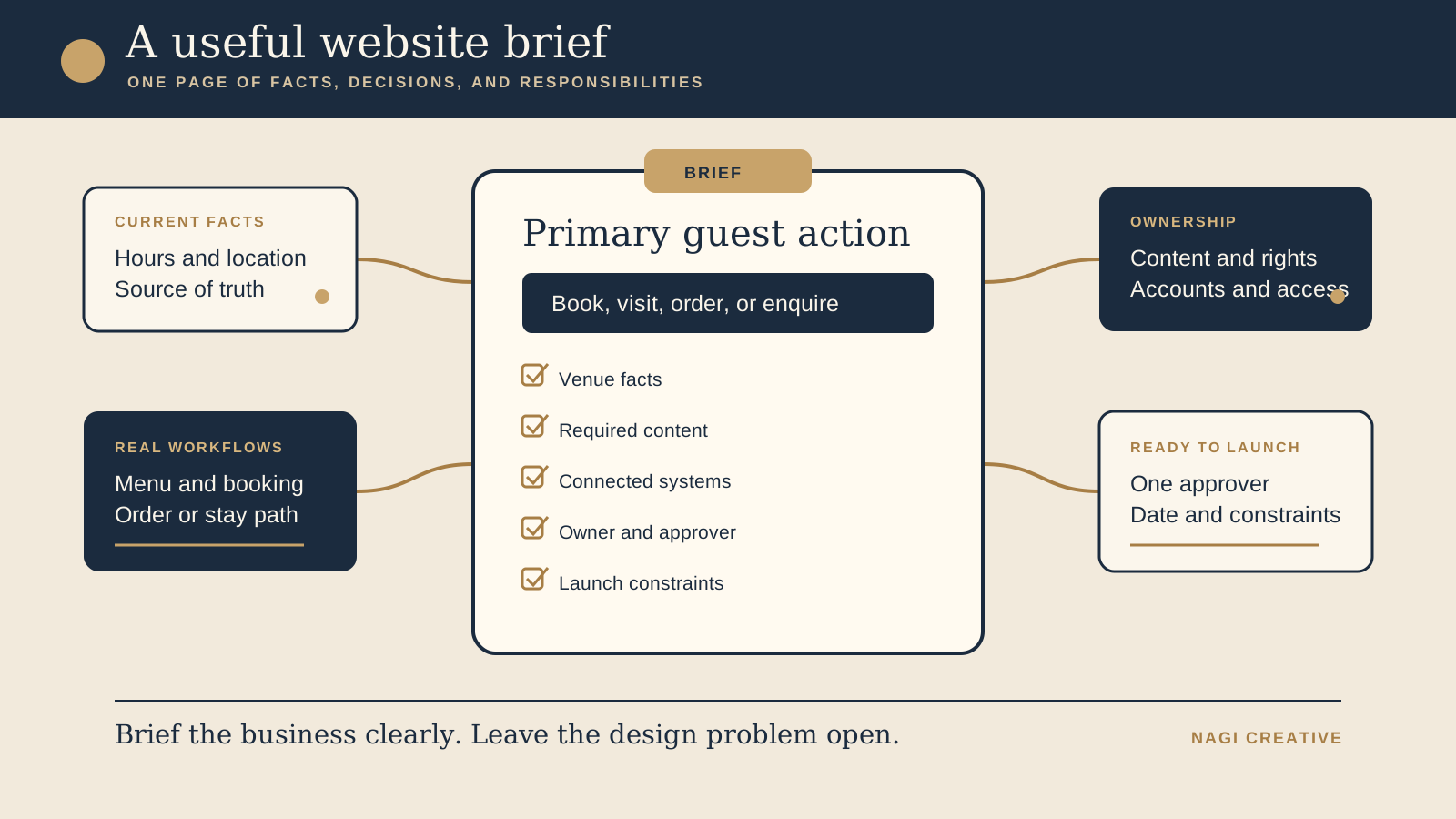
The best brief is often one page, with supporting files linked beside it. It tells a designer or developer what the venue offers, which guest decision matters most, where information is maintained, which systems the website must connect to, and who can make a final call. That is enough to begin a useful discovery conversation.
A mood board can help describe atmosphere, but it cannot confirm opening hours, explain a reservation handoff, grant access to a domain account, or decide who approves the final menu. A complete design specification is not the owner's job either. The brief should make the business clear, then leave room for the website partner to solve structure, presentation, and interaction.
Start with what is current, not what you hope the new website might become. Mark uncertain details as questions. A visible gap is easier to resolve than a polished assumption that reaches the live site.
Choose one primary guest action before listing pages
Write one sentence that completes this thought: “After visiting the website, the most important next step for a guest is to...” The answer may be book a table, view the current menu and visit, order pickup, request a private event, check room availability, or enquire about a stay. Choose the action that best reflects the venue's real operation and the purpose of this build.
Secondary actions still belong in the brief. A restaurant may need directions, calls, gift cards, and catering enquiries around a primary reservation path. A walk in cafe may lead with menu, hours, and location while keeping ordering secondary. A boutique stay may lead to availability while supporting room details, policies, and direct questions. Ranking the actions helps the project make tradeoffs when space and attention are limited.
Do not begin with a page count copied from another venue. Required pages should follow the information and decisions your guests need. If you are unsure whether the content belongs on one page or several, record the content need and let the project decide the structure. The one page or multiple pages guide can help frame that conversation without fixing the answer too early.
Record current facts and name the source of truth
Gather the facts a guest may act on: venue name, address, phone, contact email, current hours, service periods, menu, booking policy, accessibility details, parking or arrival notes, room types, check in information, and any genuine age, group, or service limits. Include only the fields that apply to your venue.
Beside each changeable fact, name where the team maintains the approved version. The current menu may live in the point of sale system, hours may be confirmed by the general manager, and stay policies may be maintained in the property management system. If the website, social profile, printed menu, and booking platform disagree, the brief should identify which one wins and who can resolve the difference.
Link the current materials instead of pasting old copies into a new document. Label each file with its status, such as approved, needs review, seasonal, or archive. This keeps an outdated menu PDF or old room description from looking like launch ready content. For several venues, list which facts are shared and which belong to each location, then use the multiple location website guide for the structural decision.
Map the real menu, booking, ordering, or stay workflows
A link alone does not explain a workflow. Show where a guest begins, which system receives them, what the team does next, and where the process can fail. Use the path that exists today, even if the website project may improve it.
- Menu: note the approved format, who updates items and availability, whether food and drinks have separate sources, and what should happen when a menu is changing.
- Reservations: name the booking platform, direct link or account, service types, party limits, waitlist or walk in rules, and the staff contact who manages settings.
- Ordering: identify pickup or delivery services, opening windows, location selection, menu ownership, order support, and the correct handoff from the website.
- Boutique stays: identify the booking engine, room and rate source, availability flow, property policies, enquiry route, and the staff member who owns guest questions.
- Enquiries: state what the form should collect, where messages arrive, who replies, and what urgent or sensitive details should stay out of the first form.
Add a real test link and a responsible contact for every connected system. Do not send passwords inside the brief. The goal is to reveal dependencies early, so access and testing can be arranged safely when needed.
Prepare photography, copy, and content rights
Create a simple asset list. Separate current venue photography, logos, menus, room details, brand files, written story, press material, and policy copy. For each group, note what is ready, what needs editing, what is missing, and who will deliver it. A folder full of unnamed images is not the same as an approved website library.
Confirm that the venue has permission to use each photograph, illustration, testimonial, logo, and piece of supplied copy on its own website. Record photographer credits or usage conditions where they apply. If staff or guests are recognisable, confirm the venue has the appropriate permission for the intended use. Do not ask the website partner to guess whether a social post, supplier image, or old press photograph can be republished.
Write down the scenes or details the site still needs, rather than choosing decorative placeholders that may survive into launch. The website photography checklist helps plan arrival, spaces, signatures, service, useful details, flexible crops, and file handoff around real guest decisions.
Clarify domain, account, access, and handover needs
List the services the project may touch: domain registrar, DNS, current hosting, website platform, business email, analytics, search tools, reservation or ordering platform, booking engine, form delivery, and any image library. For each one, record the account owner, billing contact, current administrator, and the person who can approve access. This is an ownership map, not a password sheet.
State the handover outcome you expect. That may include owner level access, a list of connected services, renewal and billing visibility, instructions for common content updates, a copy of relevant files, and a named support route after launch. Keep the venue's domain ownership decision separate from the choice of website partner. The detailed questions belong in the domain, hosting, and handover guide.
If an account is missing, controlled by a former supplier, or tied to an unknown email address, mark it as a launch risk now. Do not wait until the new website is ready to discover that nobody can change the domain settings.
Set approvals and launch constraints while they are easy to change
Name one responsible approver. Other people can advise on food, operations, rooms, brand, or legal wording, but the project needs one person who can combine feedback and make the final decision. Record how feedback will be collected and how quickly the approver can respond during the build.
Then list the practical launch constraints. Include the desired launch date and the reason behind it, such as a reopening, menu change, room release, event, or campaign. Add dates when key staff are unavailable, times when booking or ordering systems should not be disturbed, existing pages or links that must remain available, and content that cannot be published before approval.
Call the date desired rather than guaranteed until scope, assets, access, and testing are confirmed. If timing is the main concern, the website build timeline guide explains how readiness, integrations, approvals, testing, and handover affect the schedule. The brief only needs to expose those conditions, not promise an outcome before the work is understood.
Use this one page website brief template
Keep the answers short. Link to supporting files and systems instead of turning the brief into a second content archive.
- Venue facts: name, address, contacts, hours, service type, and the person or system that confirms each changing fact.
- Audience and primary action: the main guest you need to help, the one action they should take, and the secondary actions that still matter.
- Current friction: the specific questions, dead ends, outdated information, staff workarounds, or guest confusion the new site should reduce.
- Required pages or content: the information guests must find, plus any known page that must remain, move, or be retired. Let the final structure follow the content.
- Connected systems: menu, reservation, ordering, gift card, property, booking engine, enquiry, analytics, or other systems, with a responsible contact and test link.
- Content and assets: approved copy, photography, menus, logos, policies, missing material, delivery owner, and confirmed usage rights.
- Account ownership: domain, hosting, website, email, and connected service owners, billing contacts, administrators, and access risks.
- Responsible approver: one final decision maker, the advisers they will consult, and the agreed feedback route.
- Launch date: the desired date, the business reason, blackout periods, external dependencies, and what must be tested first.
- Non-negotiables: verified facts, legal or policy requirements, essential guest paths, existing URLs, brand elements, and handover needs that cannot be lost.
End with open questions. A good brief does not hide uncertainty. It shows the website partner where discovery is needed and gives the owner a clear list of decisions to resolve.
Before sending the brief, use the free Restaurant Website Quick Score on the current site. It can help you name visible friction in the menu, contact, location, and next action without turning the brief into a broad redesign wish list.
Want a practical baseline before you brief the build?
The US$35 Website Check reviews the current mobile journey, menu or stay information, booking or enquiry path, essential venue details, visual clarity, and search basics. You receive a focused priority list that can sit beside your brief and show which guest problems deserve attention first.
Get the US$35 Website Check